
솔로 크리에이터
주당 1번 AI 트래블 vlog 템플릿을 실행하고 도시를 바꾸고 발행합니다. 실제 촬영 없는 익명 여행 채널.
2개의 연결된 생성,
1개의 바이럴급 브이로그.
에디션 01 — 2단계 트래블 vlog
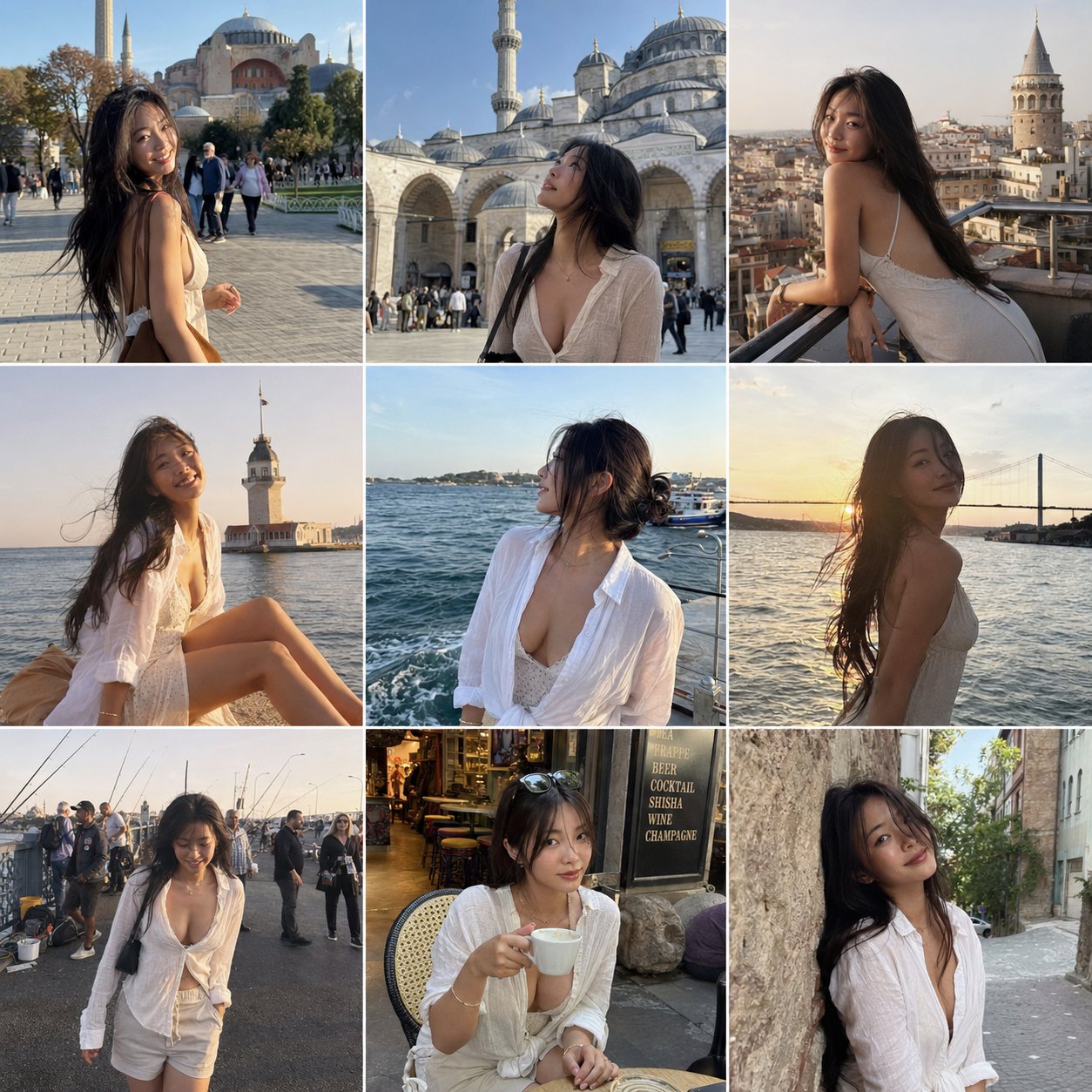
1단계는 동일한 캐릭터의 9개 순박한 프레임(같은 얼굴, 같은 몸, 같은 옷)을 선택한 일정 전체에 생성합니다. 2단계는 이 프레임들을 Seedance i2v에 전달하고 타이밍된 컷과 ASMR 콜드 오프닝이 있는 15초 handheld vlog를 렌더링합니다. 전체 프로세스는 아래 콘솔에서 실행됩니다.
아래의 프롬프트는 그대로의 소스입니다. 위의 콘솔에 복사하여 도시, 주체 또는 분위기를 조정합니다.
GPT Image 2.0용 구조화된 JSON 브리프입니다. 상세한 주체, 의상, 위치 및 부정 제약 블록은 모델이 스튜디오 글래머나 필터 광택으로 표류하는 것을 방지합니다.
{
  "objective": "Create a 3x3 Instagram feed grid featuring an attractive, sensual woman traveling in Istanbul, captured in natural smartphone-style photos",

  "aspect_ratio": "1:1",

  "composition": {
    "layout": "3x3 grid",
    "style": "Instagram travel feed",
    "spacing": "thin white borders",
    "consistency": "same woman across all images"
  },

  "subject": {
    "type": "young adult woman",
    "appearance": {
      "beauty": "naturally attractive, soft sensual look",
      "build": "slim, feminine",
      "hair": "natural, slightly messy from wind",
      "expression": "relaxed, confident, candid"
    },
    "outfits": [
      "light summer dress",
      "linen shirt slightly unbuttoned",
      "flowy skirt or casual shorts",
      "sunglasses in some shots"
    ],
    "vibe": "effortless sensuality, not posed, candid travel moments"
  },

  "locations_and_shots": [
    { "location": "Sultanahmet / Hagia Sophia", "shot": "walking across square, sunlight hitting face" },
    { "location": "Blue Mosque courtyard", "shot": "looking up at architecture" },
    { "location": "Galata Tower", "shot": "leaning on railing, city behind" },
    { "location": "Kız Kulesi (Maiden's Tower)", "shot": "sitting by the water, wind in hair" },
    { "location": "Bosphorus waterfront", "shot": "watching boats, soft candid pose" },
    { "location": "Bosphorus Bridge view", "shot": "golden hour silhouette" },
    { "location": "fishermen by the sea (Galata Bridge)", "shot": "walking past, candid interaction scene" },
    { "location": "Istanbul street café", "shot": "sitting with coffee, relaxed" },
    { "location": "narrow historic street", "shot": "leaning on wall, soft eye contact" }
  ],

  "style": {
    "camera": "smartphone photo",
    "quality": "slightly grainy, natural",
    "lighting": "natural daylight and golden hour",
    "skin": "no gloss, realistic texture",
    "color": "slightly warm travel tones"
  },

  "mood": "romantic travel, candid, lifestyle influencer aesthetic",

  "negative_constraints": [
    "no studio lighting",
    "no over-editing",
    "no unrealistic beauty filters",
    "no explicit content",
    "no artificial poses"
  ]
}
Model — gpt-image-2
Seedance 2.0 i2v용 긴 형식의 샷 목록입니다. 참조 이미지는 외형을 고정합니다; 프롬프트는 ASMR 후크 오프닝, 비트별 시퀀스, 오디오 방향, 색상 그레이드 및 피해야 할 사항을 스크립트합니다.
15-second high-energy California travel vlog starring an extremely beautiful playful sensual Japanese girl. Fast-paced multi-shot edit, trendy Gen-Z travel influencer aesthetic, cinematic handheld vlog energy, vibrant California sunlight, youthful chaotic fun, premium TikTok/Reels editing style.

IMPORTANT:
Keep her appearance and outfits consistent with the reference images:
• long black hair
• slim curvy body
• soft natural makeup
• playful bright smile
• youthful sensual energy

MAIN OUTFITS (consistent across scenes):
LOOK 1:
black triangle bikini top, oversized loose white button-up shirt worn open, light blue denim shorts, delicate necklace, casual California beach aesthetic

LOOK 2:
white cropped tank top, light gray high-waisted leggings, sporty influencer vibe

LOOK 3:
white strapless tube top with loose white sweatpants and black sunglasses

VIDEO STYLE:
• fast cuts every 1–2 seconds
• no slow motion
• energetic handheld camera
• realistic vlog movement
• natural hair physics and clothing movement
• authentic sunlight and shadows
• playful travel influencer behavior
• dynamic camera whip transitions
• high-vibes summer energy
• realistic environment physics
• subtle lens flares
• social-media luxury aesthetic

AUDIO:
Upbeat female-fronted indie rock song with driving drums and electric guitar. Ambient California city sounds underneath. Opening includes soft ASMR whisper close to microphone.

OPENING HOOK (0:00–0:02):
Extreme close-up selfie angle while walking on Hollywood Walk of Fame. She leans close to camera and whispers softly in ASMR:
"California with me today?"
She smiles mischievously and immediately pulls camera away into fast transition.

SHOT SEQUENCE:

0:02–0:04
Hollywood sign overlook. Wearing white crop top and gray leggings. Wind blowing through her hair naturally while she turns toward the camera smiling.

0:04–0:05
Fast rollercoaster POV shot. Wearing black bikini top and open white shirt. Laughing wildly as wind hits her face.

0:05–0:07
Disneyland castle background. She spins playfully while holding the edges of her oversized white shirt. Bright sunlight, energetic tourists around her.

0:07–0:09
Walking through Beverly Hills in denim shorts and fitted white crop top. Sunglasses on. Confident influencer walk. Quick hair flip toward camera.

0:09–0:11
Venice Beach palms and sand. She pauses, smiles at the ocean breeze, shirt flowing naturally in the wind.

0:11–0:13
Golden Gate Bridge overlook. Wearing sporty white crop top and gray leggings. Camera circles around her as she leans on railing looking at the water.

0:13–0:15
Santa Monica Pier at sunset. She walks toward camera laughing, grabs the camera playfully with one hand, then final fast whip-pan ending on palm-tree-lined California street.

COLOR & LOOK:
Golden California sunlight, vibrant blue skies, dreamy summer glow, cinematic travel vlog grading, social-media luxury aesthetic, realistic skin texture, natural body motion, energetic editing rhythm.

NEGATIVE:
No slow motion, no stiff movement, no duplicate people, no unrealistic physics, no floating hair, no uncanny facial animation, no anime style.
Model — seedance-2-beta
리믹스를 조정한 후에는 프롬프트 쌍을 저장하고 모든 목적지, 계절 또는 페르소나에 대해 다시 실행합니다.
모든 템플릿 둘러보기AI 트래블 vlog 템플릿은 텍스트만으로 15초의 영화적 트래블 vlog를 생성하는 2패스 워크플로우입니다. 첫 번째 패스는 지점 전체의 단일 캐릭터의 9개 일관된 참조 프레임을 작성합니다. 두 번째 패스는 이 프레임들을 handheld vlog로 애니메이트하며 타이밍된 컷과 ASMR 오프닝이 포함됩니다 — 카메라 없음, 모델 없음, 편집 타임라인 없음.
위의 콘솔 내에서 AI 트래블 vlog 템플릿을 실행합니다. 단계 1은 구조화된 JSON 브리프를 사용하여 GPT Image 2.0을 호출합니다. 단계 2는 그리드를 참조 세트로 Seedance 2.0 image-to-video에 전달합니다. 도시를 바꾸고, 페르소나를 바꾸고, 생성을 클릭하고, AI 트래블 vlog 템플릿의 최종 클립을 배포합니다. GPT Image 2.0 image studio · Seedance 2.0 image-to-video
캐릭터 고정
AI 트래블 vlog 템플릿의 모든 9개 프레임과 최종 vlog에서 같은 얼굴, 몸, 옷.
일정 커버리지
어느 도시나 선택하세요. AI 트래블 vlog 템플릿의 프롬프트는 실제 여행처럼 보이는 9개의 순박한 위치를 스캐폴드합니다.
세로 최적화
Reels, TikTok, Shorts에 맞는 크기의 출력. 재프레이밍 패스는 없습니다.
사운드 켜기
ASMR 오프닝 속삭임과 인디 록 베드. 별도의 오디오 편집기는 필요 없습니다.
1개의 캐릭터가 모든 컷에서 같아 보여야 하는 짧은 세로 클립을 배포하는 모든 사람.
주당 1번 AI 트래블 vlog 템플릿을 실행하고 도시를 바꾸고 발행합니다. 실제 촬영 없는 익명 여행 채널.
AI 트래블 vlog 템플릿의 클립을 호텔, 항공사 또는 여행 예약 링크와 짝지으세요. 1개 템플릿, 수십 개 목적지.
브랜드 페르소나를 한 번 고정하세요. 캐릭터가 온브랜드로 유지되도록 캠페인 전체에서 AI 트래블 vlog 템플릿을 재사용하세요.
하루 만에 현지화된 여행 클립을 배포하세요. AI 트래블 vlog 템플릿은 프롬프트 스왑으로 확장되며 촬영은 없습니다.
AI 트래블 vlog 템플릿이 짧은 세로 비디오의 모든 중요한 축에서 기존 제작을 능가하는 이유.
See credit pricing · Seedance 2.0 Fast · Seedance 2.0 prompt library
AI 트래블 vlog 템플릿은 쌍으로 이루어진 프롬프트입니다: 3x3 일관된 여행 샷 그리드를 생성하는 GPT Image 2.0 JSON 브리프와 이 9개 프레임을 타이밍된 컷, ASMR 오프닝, 색상 그레이드가 있는 15초 handheld vlog로 변환하는 Seedance 2.0 i2v 샷 목록입니다. 두 프롬프트 모두 이 페이지에 있으며 자유롭게 리믹스할 수 있습니다.
아니요. AI 트래블 vlog 템플릿의 단계 1은 참조 사진을 생성합니다. 이미 9개의 일관된 캐릭터 샷이 있다면 단계 1을 건너뛰고 AI 트래블 vlog 템플릿의 비디오 프롬프트를 사용하여 단계 2에 직접 공급합니다.
예. 단계 1 프롬프트의 locations_and_shots 배열과 단계 2 샷 목록의 랜드마크 참조를 편집합니다. Istanbul, Tokyo, Lisbon, Marrakech 모두 작동합니다 — 9개의 인식 가능한 장소가 있는 곳이면 AI 트래블 vlog 템플릿이 따라갑니다.
Seedance 2.0 Fast에서 약 4분 종단간. 단계 1(이미지 그리드)은 약 1분 걸립니다. 단계 2(15초 비디오)는 약 3분 걸립니다.
참조 그리드용 GPT Image 2.0과 image-to-video 패스용 Seedance 2.0. 둘 다 추가 설정 없이 seedance2.so에서 실행됩니다 — AI 트래블 vlog 템플릿 프롬프트는 위의 콘솔에 사전 로드됩니다.
예 — 이것이 단계 1의 JSON 브리프의 핵심입니다. 프롬프트는 미용, 체형, 머리, 옷, 부정 제약 블록을 자세히 설명하여 모델이 스튜디오 글래머나 필터 광택으로 표류하지 않도록 합니다. 그리드는 그 후 AI 트래블 vlog 템플릿의 비디오 패스에 대한 외형을 고정합니다.
seedance2.so의 생성물은 당신이 사용할 수 있습니다. 브랜드 채널에 게시하기 전에 AI 트래블 vlog 템플릿 프롬프트에서 제3자 상표(Disneyland 성, Hollywood Walk of Fame, 브랜드 명 장소)를 확인하세요.
일반 텍스트-비디오 프롬프트는 모델에 즉석에서 캐릭터를 발명하도록 요청합니다. AI 트래블 vlog 템플릿은 캐릭터 생성(단계 1)을 모션(단계 2)에서 분리하여 일관성이 모든 컷에서 유지되도록 합니다. 그 분리가 클립이 1개 여행처럼 보이는 이유입니다 — 9개의 임의 장면이 아닙니다.
2개 프롬프트, 1개 콘솔, 1개 렌더. 복사, 도시 바꾸기, 생성 — 또는 더 많은 AI 워크플로우 템플릿을 참조하세요.