
舞蹈創作者
每週發布新的病毒式編舞。AI 舞蹈教學範本透過提示詞調整來擴展 — 無需拍攝、無需排練時間。
十六步,
一個 教學級 舞蹈。
Edition 02 — 二步舞蹈教學
第一步編寫黑白 4x4 編舞表 — 十六個編號面板,同一舞者、同樣服裝,面板間有動作箭頭。第二步把表交給 Seedance i2v,製作十五秒直式舞蹈教學,節拍緊湊流暢。整個過程在下方控制台進行。
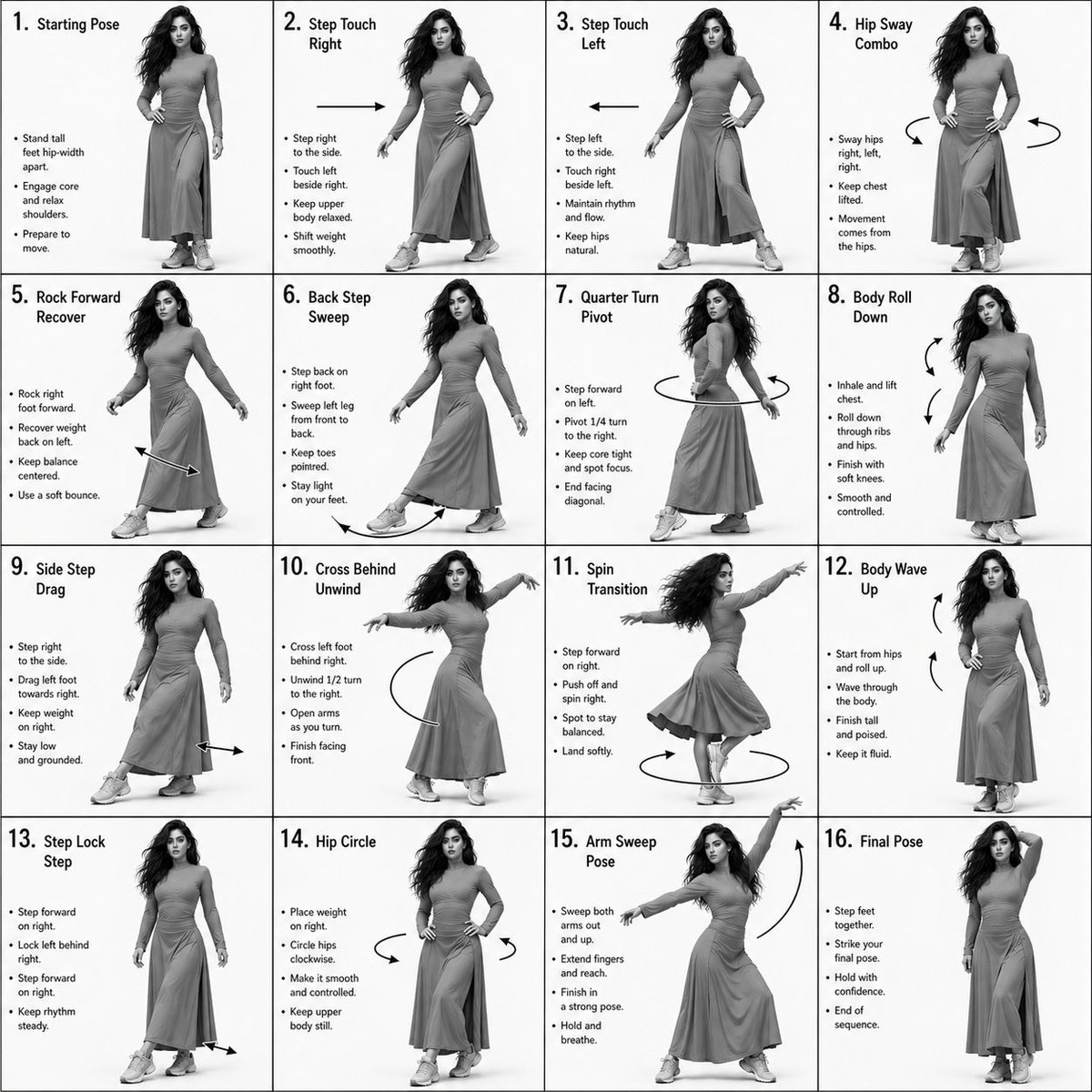
下方提示詞是完整源碼。複製到上方控制台並調整舞者、服裝或動作清單。
為 GPT Image 2.0 撰寫的完整提示詞,要求生成黑白 4x4 網格 — 每個面板一個全身姿態、步驟編號加動作標題、三行指示與動作箭頭。否定約束確保表格清晰易讀。
Dance Sequence Instruction Sheet

[VISUAL STYLE]
Monochrome grayscale composition featuring a highly detailed 3D-rendered female dancer. Designed like a professional choreography guide with a technical, diagram-inspired layout. Clean white background, soft studio lighting, and strong contrast to highlight body movement and posture.

[GRID LAYOUT]
Structured 4×4 panel grid (16 frames total), evenly spaced with thin black divider lines. Each panel is identical in size and clearly numbered from 1 to 16 to show a continuous dance progression.

[CHARACTER]
Use image1 as the base character. The same female dancer appears consistently across all panels with accurate likeness and proportions.

[WARDROBE]
The dancer wears a stylish, performance-ready outfit: a well-fitted top paired with a short, flowy skirt. The look should feel modern and visually appealing while still practical for dance movement. Fabric should subtly respond to motion (slight flow and folds), even in grayscale.

[PANEL STRUCTURE – EACH FRAME]
Top-left: Step number + short dance move title (e.g., "Step 5 – Spin Transition")
Center: Full-body pose capturing a precise moment in the choreography
Bottom-left: 3–4 lines of concise instruction describing the move
Overlay: Motion arrows and directional guides illustrating how the dancer transitions

[MOTION INDICATORS]
Incorporate curved arrows for fluid motion, straight arrows for directional steps, and circular indicators for spins or turns. Emphasize rhythm, weight shifts, and body isolation.

[RENDER QUALITY]
High-detail sculpted 3D style with smooth grayscale shading, subtle shadows, and clean linework. Maintain a polished, concept-art level finish with clarity in every pose.

[RESTRICTIONS]
No color, no background scenery, no extra characters, no visual clutter — only the dancer and instructional elements.
Model — gpt-image-2
為 Seedance 2.0 i2v 撰寫的場景鏡頭清單。參考表鎖定舞者;提示詞編寫 16 個步驟的嚴格順序、攝機方向、服裝連貫性、音樂 BPM 與最終造型定格。
[PROJECT TYPE]
Cinematic dance tutorial video with structured choreography progression.

[SCENE & ENVIRONMENT]
Spacious modern dance studio / rehearsal hall with neutral tones, smooth wooden floor, soft diffused studio lighting. Minimal background distractions. Slight natural shadows for realism.

[CHARACTER]
Single female dancer matching the reference image (same facial structure, hair volume, and proportions). Consistent identity across the full video. Natural expressions, confident and focused.

[WARDROBE]
Modest, performance-ready outfit:
• Long, flowy skirt (mid-calf length, elegant movement)
• Fully covered fitted top (no cleavage, high neckline, long or mid sleeves)
• Neutral tones (grayscale-friendly look)
• Light sneakers suitable for dance
Fabric should respond naturally to motion (subtle flow, folds, inertia).

[VIDEO STRUCTURE — CORE REQUIREMENT]
The video must follow exactly 16 sequential dance steps, matching the choreography sheet.
Each step should:
• Flow continuously into the next (no hard cuts)
• Last ~2–3 seconds (compressed within the 15s total)
• Maintain rhythm continuity
• Preserve body positioning accuracy

[CAMERA DIRECTION]
Start: Medium full-body front shot
Smooth tracking + subtle dolly movements
Occasional slight angle shifts (front → 3/4 → side) to enhance clarity
No rapid cuts or jitter
Keep dancer fully visible at all times

[CHOREOGRAPHY FLOW — STRICT ORDER]
1. Starting Pose
2. Step Touch Right
3. Step Touch Left
4. Hip Sway Combo
5. Rock Forward Recover
6. Back Step Sweep
7. Quarter Turn Pivot
8. Body Roll Down
9. Side Step Drag
10. Cross Behind Unwind
11. Spin Transition
12. Body Wave Up
13. Step Lock Step
14. Hip Circle
15. Arm Sweep Pose
16. Final Pose (hold for 2–3 seconds)

[MOTION STYLE]
Smooth, controlled, natural human motion. Emphasis on weight shifts, hip movement, and balance. Clean transitions between steps. No exaggerated or AI-like jitter. Maintain realistic timing and momentum.

[VISUAL STYLE]
Photorealistic (NOT stylized AI look). Soft cinematic contrast. Optional subtle grayscale or muted color palette. Clean composition, no overlays or graphics.

[MUSIC DIRECTION]
Genre: Chill pop / soft electronic / light Afrobeat fusion
Tempo: ~90–105 BPM (ideal for step clarity)
Mood: Smooth, confident, slightly upbeat
Clear rhythm to match each movement transition
Light bass + soft percussion + ambient melody

[SYNC NOTES]
Each step aligns with beat transitions. Spins and turns hit musical accents. Final pose lands on a clean musical resolve.

[OUTPUT QUALITY]
9:16 vertical · 4K resolution · 24–30 FPS · high motion clarity · no artifacts or distortion.
Model — seedance-2-beta
一旦你調整出喜歡的編舞,保存提示詞配對,為每個音樂、季節或角色重新執行。
瀏覽全部範本AI 舞蹈教學範本是一個二階工作流,只需文字即可製作 15 秒直式舞蹈教學。第一階編寫黑白 4x4 指導表 — 十六個編號面板展示同一舞者連貫的編舞節拍。第二階動畫化這些節拍成流暢教學影片,動作與音樂同步。
在上方控制台運行 AI 舞蹈教學範本。第一步調用 GPT Image 2.0,鎖定舞者面容、服裝並添加動作箭頭。第二步把編舞表交給 Seedance 2.0 image-to-video 做參考。改動作、換舞者、點生成、發佈最終短片。 GPT Image 2.0 image studio · Seedance 2.0 image-to-video
舞者鎖定
AI 舞蹈教學範本的所有十六個面板和最終舞蹈中,面容、身體、服裝保持一致。
16 步連貫性
AI 舞蹈教學範本強制順序動作 — 無跳拍、無突兀剪接。
9:16 直式
尺寸適合 Reels、TikTok 和 Shorts。原生直式 — 無須裁剪。
BPM 感知動作
每步落在節拍上。旋轉在重音,最終造型在清晰樂句解決。
任何發布短形式直式舞蹈內容且需要一位表演者在多個鏡頭間保持編舞連貫性的人。
每週發布新的病毒式編舞。AI 舞蹈教學範本透過提示詞調整來擴展 — 無需拍攝、無需排練時間。
在教學前視覺化一套編舞。16 步表同時可作為上課講義。
用鎖定角色製作每週動作 Reel。AI 舞蹈教學範本保持品牌代表的一致性。
每次發行伴隨舞蹈短片。AI 舞蹈教學範本處理表演者;你調整 BPM 和動作。
為什麼 AI 舞蹈教學範本比工作室拍攝更適合短形式社群舞蹈內容,其中連貫性比技巧更重要。
See credit pricing · Seedance 2.0 Fast · Travel vlog template
AI 舞蹈教學範本是配對提示詞:GPT Image 2.0 提示詞生成 16 個連貫編舞面板的黑白 4x4 網格,Seedance 2.0 i2v 提示詞把那些面板變成 15 秒直式舞蹈影片。兩個提示詞都在本頁且可自由改寫。
不需要。AI 舞蹈教學範本的第一步提示詞命名十六個動作(踏步觸碰、臀部搖擺、旋轉過渡、身體波浪等)。替換任意動作名稱,模型就會適應面板。
能。編輯第一步的角色描述和服裝區塊。AI 舞蹈教學範本會把鎖定延伸到第二步,使舞者在 4x4 表和最終影片間保持一致。
在 Seedance 2.0 Fast 上約四分鐘。第一步(編舞表)約一分鐘。第二步(15 秒影片)約三分鐘。
9:16 直式 — TikTok、Reels 和 Shorts 原生尺寸。無須裁剪。參考編舞表是 1:1 正方形;最終影片是 9:16 直式。
會 — 這正是第一步提示詞的重點。提示詞鎖定美貌、體型、髮型、服裝,並加入否定約束讓模型不在面板間偏移成另一個表演者。表格再把外觀鎖定給 AI 舞蹈教學範本的影片階段。
能。第二步提示詞命名目標 BPM 並要求節拍同步動作。把 BPM 設成你的音樂速度,再在任何編輯器中把渲染影片同步到音頻。
單純文字轉影片提示詞讓模型即時發明編舞 — 通常會在剪輯中偏移。AI 舞蹈教學範本先視覺化十六步計畫,所以影片階段對著鎖定的地圖渲染。這就是為什麼每個節拍都清晰易讀。