
Solo creators
Run the AI travel vlog template once a week, swap the city, publish. A faceless travel channel without filming.
Two chained generations,
one viral-grade vlog.
Edition 01 — A two-step travel vlog
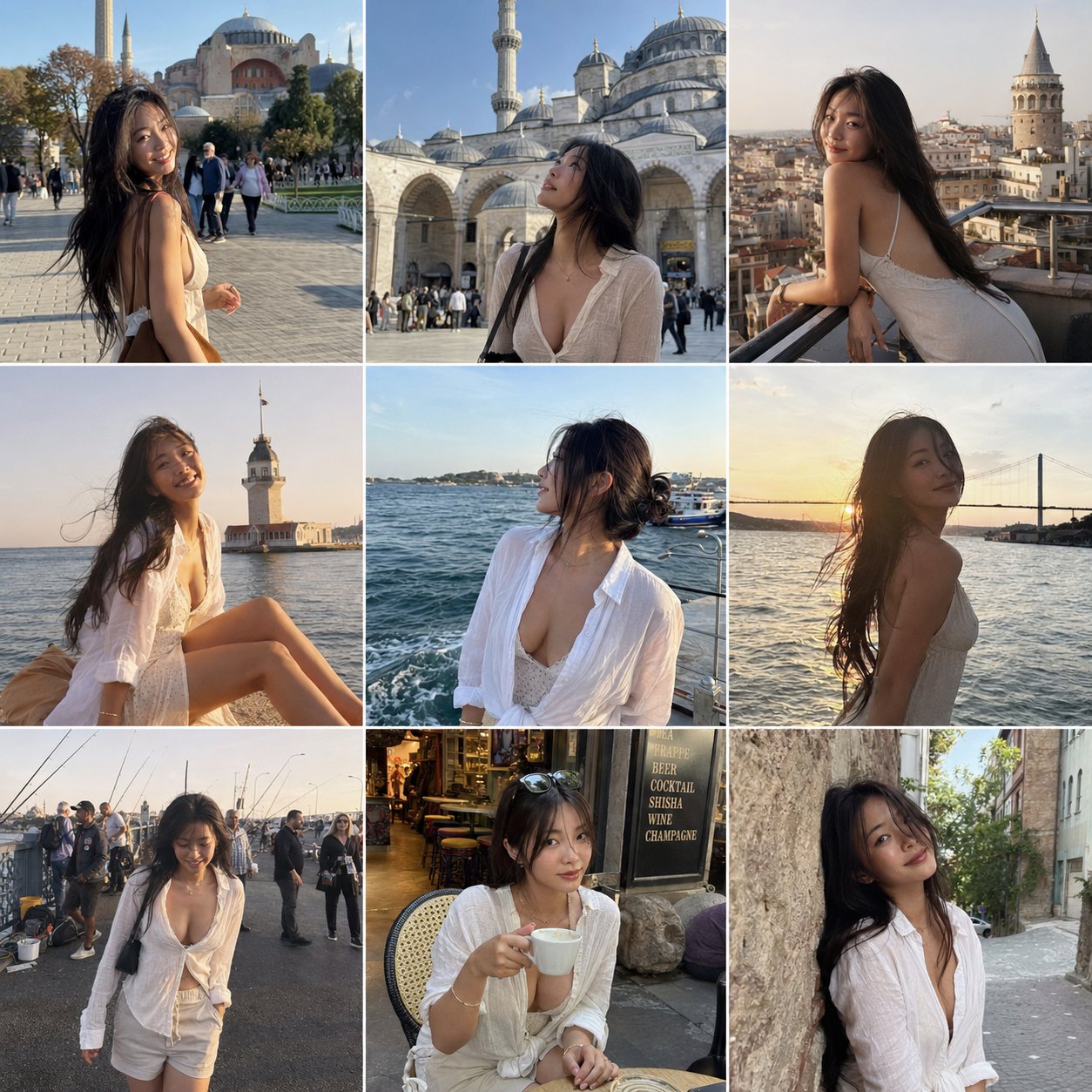
Step one writes nine candid frames of the same character — same face, same body, same wardrobe — across an itinerary you pick. Step two hands those frames to Seedance i2v and renders a fifteen-second handheld vlog with timed cuts and an ASMR cold open. The whole thing happens in the console below.
The prompts below are the verbatim source. Copy them into the console above and tweak the city, subject, or vibe.
A structured JSON brief for GPT Image 2.0. Spelled-out subject, outfits, locations, and a negative-constraints block keep the model from drifting into studio glamour or filter sheen.
{
  "objective": "Create a 3x3 Instagram feed grid featuring an attractive, sensual woman traveling in Istanbul, captured in natural smartphone-style photos",

  "aspect_ratio": "1:1",

  "composition": {
    "layout": "3x3 grid",
    "style": "Instagram travel feed",
    "spacing": "thin white borders",
    "consistency": "same woman across all images"
  },

  "subject": {
    "type": "young adult woman",
    "appearance": {
      "beauty": "naturally attractive, soft sensual look",
      "build": "slim, feminine",
      "hair": "natural, slightly messy from wind",
      "expression": "relaxed, confident, candid"
    },
    "outfits": [
      "light summer dress",
      "linen shirt slightly unbuttoned",
      "flowy skirt or casual shorts",
      "sunglasses in some shots"
    ],
    "vibe": "effortless sensuality, not posed, candid travel moments"
  },

  "locations_and_shots": [
    { "location": "Sultanahmet / Hagia Sophia", "shot": "walking across square, sunlight hitting face" },
    { "location": "Blue Mosque courtyard", "shot": "looking up at architecture" },
    { "location": "Galata Tower", "shot": "leaning on railing, city behind" },
    { "location": "Kız Kulesi (Maiden's Tower)", "shot": "sitting by the water, wind in hair" },
    { "location": "Bosphorus waterfront", "shot": "watching boats, soft candid pose" },
    { "location": "Bosphorus Bridge view", "shot": "golden hour silhouette" },
    { "location": "fishermen by the sea (Galata Bridge)", "shot": "walking past, candid interaction scene" },
    { "location": "Istanbul street café", "shot": "sitting with coffee, relaxed" },
    { "location": "narrow historic street", "shot": "leaning on wall, soft eye contact" }
  ],

  "style": {
    "camera": "smartphone photo",
    "quality": "slightly grainy, natural",
    "lighting": "natural daylight and golden hour",
    "skin": "no gloss, realistic texture",
    "color": "slightly warm travel tones"
  },

  "mood": "romantic travel, candid, lifestyle influencer aesthetic",

  "negative_constraints": [
    "no studio lighting",
    "no over-editing",
    "no unrealistic beauty filters",
    "no explicit content",
    "no artificial poses"
  ]
}
Model — gpt-image-2
A long-form shot list for Seedance 2.0 i2v. Reference images lock the look; the prompt scripts the opening ASMR hook, beat-by-beat sequence, audio direction, color grade, and what to avoid.
15-second high-energy California travel vlog starring an extremely beautiful playful sensual Japanese girl. Fast-paced multi-shot edit, trendy Gen-Z travel influencer aesthetic, cinematic handheld vlog energy, vibrant California sunlight, youthful chaotic fun, premium TikTok/Reels editing style.

IMPORTANT:
Keep her appearance and outfits consistent with the reference images:
• long black hair
• slim curvy body
• soft natural makeup
• playful bright smile
• youthful sensual energy

MAIN OUTFITS (consistent across scenes):
LOOK 1:
black triangle bikini top, oversized loose white button-up shirt worn open, light blue denim shorts, delicate necklace, casual California beach aesthetic

LOOK 2:
white cropped tank top, light gray high-waisted leggings, sporty influencer vibe

LOOK 3:
white strapless tube top with loose white sweatpants and black sunglasses

VIDEO STYLE:
• fast cuts every 1–2 seconds
• no slow motion
• energetic handheld camera
• realistic vlog movement
• natural hair physics and clothing movement
• authentic sunlight and shadows
• playful travel influencer behavior
• dynamic camera whip transitions
• high-vibes summer energy
• realistic environment physics
• subtle lens flares
• social-media luxury aesthetic

AUDIO:
Upbeat female-fronted indie rock song with driving drums and electric guitar. Ambient California city sounds underneath. Opening includes soft ASMR whisper close to microphone.

OPENING HOOK (0:00–0:02):
Extreme close-up selfie angle while walking on Hollywood Walk of Fame. She leans close to camera and whispers softly in ASMR:
"California with me today?"
She smiles mischievously and immediately pulls camera away into fast transition.

SHOT SEQUENCE:

0:02–0:04
Hollywood sign overlook. Wearing white crop top and gray leggings. Wind blowing through her hair naturally while she turns toward the camera smiling.

0:04–0:05
Fast rollercoaster POV shot. Wearing black bikini top and open white shirt. Laughing wildly as wind hits her face.

0:05–0:07
Disneyland castle background. She spins playfully while holding the edges of her oversized white shirt. Bright sunlight, energetic tourists around her.

0:07–0:09
Walking through Beverly Hills in denim shorts and fitted white crop top. Sunglasses on. Confident influencer walk. Quick hair flip toward camera.

0:09–0:11
Venice Beach palms and sand. She pauses, smiles at the ocean breeze, shirt flowing naturally in the wind.

0:11–0:13
Golden Gate Bridge overlook. Wearing sporty white crop top and gray leggings. Camera circles around her as she leans on railing looking at the water.

0:13–0:15
Santa Monica Pier at sunset. She walks toward camera laughing, grabs the camera playfully with one hand, then final fast whip-pan ending on palm-tree-lined California street.

COLOR & LOOK:
Golden California sunlight, vibrant blue skies, dreamy summer glow, cinematic travel vlog grading, social-media luxury aesthetic, realistic skin texture, natural body motion, energetic editing rhythm.

NEGATIVE:
No slow motion, no stiff movement, no duplicate people, no unrealistic physics, no floating hair, no uncanny facial animation, no anime style.
Model — seedance-2-beta
Once you've tuned a remix you like, save the prompt pair and re-run for every destination, season, or persona.
Browse all templatesThe AI travel vlog template is a two-pass workflow that produces a 15-second cinematic travel vlog from text alone. The first pass writes nine consistent reference frames of a single character across landmarks. The second pass animates those frames into a handheld vlog with timed cuts and an ASMR opening — no camera, no model, no edit timeline.
You run the AI travel vlog template inside the console above. Step one calls GPT Image 2.0 with a structured JSON brief. Step two hands the grid to Seedance 2.0 image-to-video as a reference set. Swap the city, swap the persona, hit generate, ship the AI travel vlog template's final clip. GPT Image 2.0 image studio · Seedance 2.0 image-to-video
Character lock
Same face, body, and wardrobe across all nine frames and the final vlog from the AI travel vlog template.
Itinerary coverage
Pick any city. The AI travel vlog template's prompt scaffolds nine candid spots that read as a real trip.
Vertical-ready
Output sized for Reels, TikTok, and Shorts. No re-cropping pass.
Sound on
Opening ASMR whisper plus indie-rock bed. No separate audio editor.
Anyone shipping short vertical clips where one character has to look the same in every cut.
Run the AI travel vlog template once a week, swap the city, publish. A faceless travel channel without filming.
Pair the AI travel vlog template's clip with a hotel, airline, or tour booking link. One template, dozens of destinations.
Lock a brand persona once. Reuse the AI travel vlog template across campaigns so the character stays on-model.
Ship localized travel cuts in a day. The AI travel vlog template scales with prompt swaps, not shoots.
Why the AI travel vlog template beats a traditional production run on every axis that matters for short vertical video.
See credit pricing · Seedance 2.0 Fast · Seedance 2.0 prompt library
The AI travel vlog template is a paired prompt: a GPT Image 2.0 JSON brief that produces a 3x3 grid of consistent travel shots, and a Seedance 2.0 i2v shot list that turns those nine frames into a 15-second handheld vlog with timed cuts, an ASMR opening, and a color grade. Both prompts live on this page and are free to remix.
No. Step one of the AI travel vlog template generates the reference photos for you. If you already have nine consistent character shots, skip step one and feed them straight into step two with the AI travel vlog template's video prompt.
Yes. Edit the locations_and_shots array in the step-one prompt and the landmark references in the step-two shot list. Istanbul, Tokyo, Lisbon, Marrakech all work — pick anywhere with nine recognizable spots and the AI travel vlog template will follow.
About four minutes end-to-end on Seedance 2.0 Fast. Step one (the image grid) takes around a minute. Step two (the 15-second video) takes around three.
GPT Image 2.0 for the reference grid and Seedance 2.0 for the image-to-video pass. Both run on seedance2.so without extra setup — the AI travel vlog template prompts are pre-loaded in the console above.
Yes — that is the whole point of the JSON brief in step one. The prompt spells out beauty, build, hair, outfits, and a negative-constraints block so the model does not drift into studio glamour or filter sheen. The grid then locks the look for the AI travel vlog template's video pass.
Generations from seedance2.so are yours to use. Check the AI travel vlog template prompt for any third-party trademarks (Disneyland castle, Hollywood Walk of Fame, brand-name venues) before publishing on a brand channel.
A plain text-to-video prompt asks the model to invent a character on the fly. The AI travel vlog template separates character generation (step one) from motion (step two) so consistency holds across every cut. That separation is why the clip looks like one trip — not nine random scenes.
Two prompts, one console, one render. Copy, swap the city, generate — or browse all AI workflow templates.