
ソロ クリエイター
週 1 回 AI トラベル vlog テンプレートを実行し、都市を入れ替え、公開します。実際の撮影なしで顔のない旅行チャネル。
2 つの連鎖生成、
1 つの ウイルス級 vlog。
エディション 01 — 2ステップのトラベル vlog
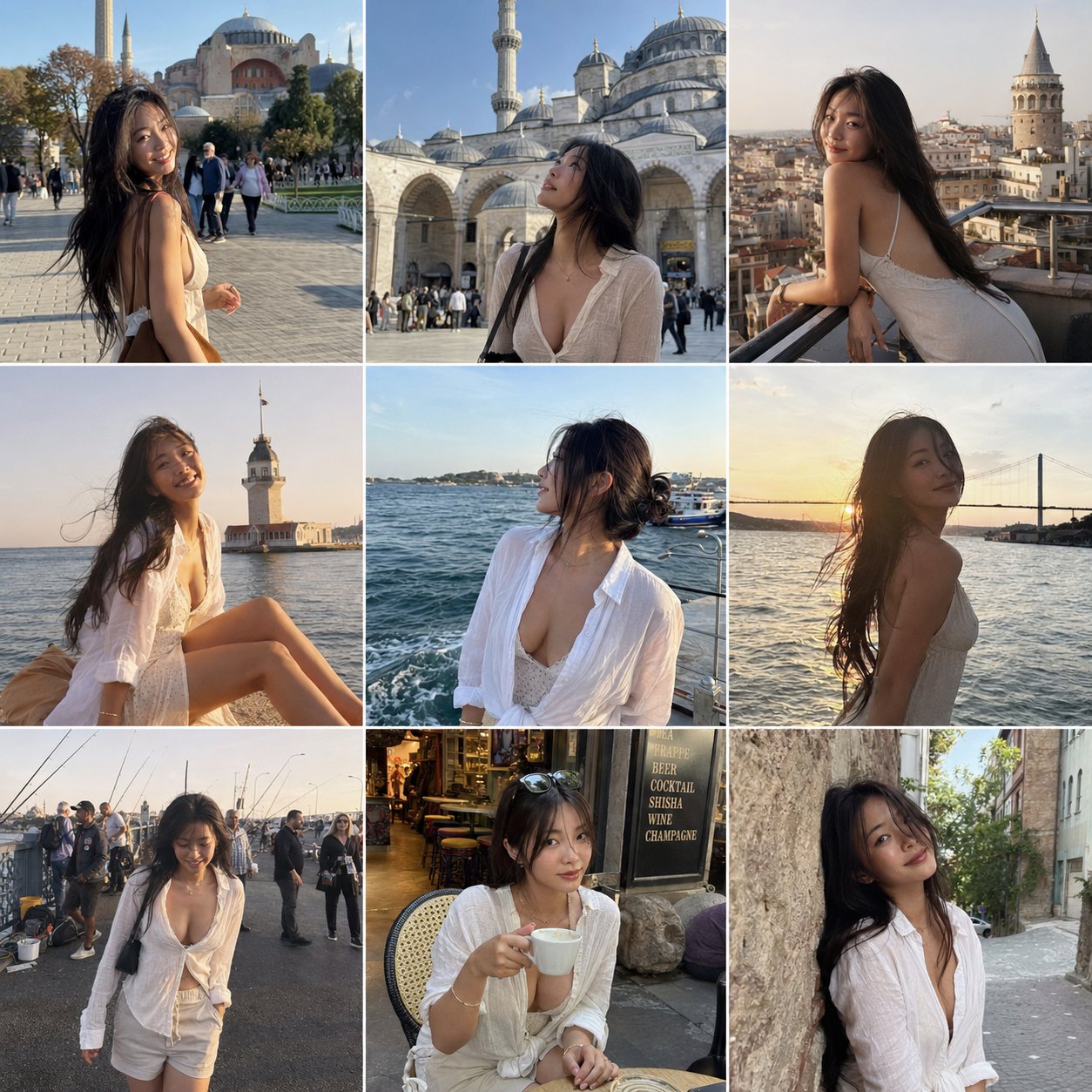
ステップ 1 では、同じキャラクターの 9 枚の素朴なフレーム(同じ顔、同じボディ、同じワードローブ)を、選択したイテラリーぜ全体に生成します。ステップ 2 では、それらのフレームを Seedance i2v に渡し、タイムカット付きの 15 秒 handheld vlog と ASMR コールドオープンをレンダリングします。すべてのプロセスは下のコンソールで実行されます。
以下のプロンプトは逐語的なソースです。上のコンソールにコピーして、都市、被写体、または雰囲気を調整します。
GPT Image 2.0 向けの構造化 JSON ブリーフ。詳細な被写体、衣装、ロケーション、ネガティブ制約ブロックは、モデルがスタジオのグラマーやフィルター光沢に漂流するのを防ぎます。
{
  "objective": "Create a 3x3 Instagram feed grid featuring an attractive, sensual woman traveling in Istanbul, captured in natural smartphone-style photos",

  "aspect_ratio": "1:1",

  "composition": {
    "layout": "3x3 grid",
    "style": "Instagram travel feed",
    "spacing": "thin white borders",
    "consistency": "same woman across all images"
  },

  "subject": {
    "type": "young adult woman",
    "appearance": {
      "beauty": "naturally attractive, soft sensual look",
      "build": "slim, feminine",
      "hair": "natural, slightly messy from wind",
      "expression": "relaxed, confident, candid"
    },
    "outfits": [
      "light summer dress",
      "linen shirt slightly unbuttoned",
      "flowy skirt or casual shorts",
      "sunglasses in some shots"
    ],
    "vibe": "effortless sensuality, not posed, candid travel moments"
  },

  "locations_and_shots": [
    { "location": "Sultanahmet / Hagia Sophia", "shot": "walking across square, sunlight hitting face" },
    { "location": "Blue Mosque courtyard", "shot": "looking up at architecture" },
    { "location": "Galata Tower", "shot": "leaning on railing, city behind" },
    { "location": "Kız Kulesi (Maiden's Tower)", "shot": "sitting by the water, wind in hair" },
    { "location": "Bosphorus waterfront", "shot": "watching boats, soft candid pose" },
    { "location": "Bosphorus Bridge view", "shot": "golden hour silhouette" },
    { "location": "fishermen by the sea (Galata Bridge)", "shot": "walking past, candid interaction scene" },
    { "location": "Istanbul street café", "shot": "sitting with coffee, relaxed" },
    { "location": "narrow historic street", "shot": "leaning on wall, soft eye contact" }
  ],

  "style": {
    "camera": "smartphone photo",
    "quality": "slightly grainy, natural",
    "lighting": "natural daylight and golden hour",
    "skin": "no gloss, realistic texture",
    "color": "slightly warm travel tones"
  },

  "mood": "romantic travel, candid, lifestyle influencer aesthetic",

  "negative_constraints": [
    "no studio lighting",
    "no over-editing",
    "no unrealistic beauty filters",
    "no explicit content",
    "no artificial poses"
  ]
}
Model — gpt-image-2
Seedance 2.0 i2v 向けの長形式ショットリスト。参照画像はルックをロック;プロンプトはオープニングの ASMR フック、ビート ごとのシーケンス、オーディオ方向、カラーグレード、避けるべきことをスクリプト化します。
15-second high-energy California travel vlog starring an extremely beautiful playful sensual Japanese girl. Fast-paced multi-shot edit, trendy Gen-Z travel influencer aesthetic, cinematic handheld vlog energy, vibrant California sunlight, youthful chaotic fun, premium TikTok/Reels editing style.

IMPORTANT:
Keep her appearance and outfits consistent with the reference images:
• long black hair
• slim curvy body
• soft natural makeup
• playful bright smile
• youthful sensual energy

MAIN OUTFITS (consistent across scenes):
LOOK 1:
black triangle bikini top, oversized loose white button-up shirt worn open, light blue denim shorts, delicate necklace, casual California beach aesthetic

LOOK 2:
white cropped tank top, light gray high-waisted leggings, sporty influencer vibe

LOOK 3:
white strapless tube top with loose white sweatpants and black sunglasses

VIDEO STYLE:
• fast cuts every 1–2 seconds
• no slow motion
• energetic handheld camera
• realistic vlog movement
• natural hair physics and clothing movement
• authentic sunlight and shadows
• playful travel influencer behavior
• dynamic camera whip transitions
• high-vibes summer energy
• realistic environment physics
• subtle lens flares
• social-media luxury aesthetic

AUDIO:
Upbeat female-fronted indie rock song with driving drums and electric guitar. Ambient California city sounds underneath. Opening includes soft ASMR whisper close to microphone.

OPENING HOOK (0:00–0:02):
Extreme close-up selfie angle while walking on Hollywood Walk of Fame. She leans close to camera and whispers softly in ASMR:
"California with me today?"
She smiles mischievously and immediately pulls camera away into fast transition.

SHOT SEQUENCE:

0:02–0:04
Hollywood sign overlook. Wearing white crop top and gray leggings. Wind blowing through her hair naturally while she turns toward the camera smiling.

0:04–0:05
Fast rollercoaster POV shot. Wearing black bikini top and open white shirt. Laughing wildly as wind hits her face.

0:05–0:07
Disneyland castle background. She spins playfully while holding the edges of her oversized white shirt. Bright sunlight, energetic tourists around her.

0:07–0:09
Walking through Beverly Hills in denim shorts and fitted white crop top. Sunglasses on. Confident influencer walk. Quick hair flip toward camera.

0:09–0:11
Venice Beach palms and sand. She pauses, smiles at the ocean breeze, shirt flowing naturally in the wind.

0:11–0:13
Golden Gate Bridge overlook. Wearing sporty white crop top and gray leggings. Camera circles around her as she leans on railing looking at the water.

0:13–0:15
Santa Monica Pier at sunset. She walks toward camera laughing, grabs the camera playfully with one hand, then final fast whip-pan ending on palm-tree-lined California street.

COLOR & LOOK:
Golden California sunlight, vibrant blue skies, dreamy summer glow, cinematic travel vlog grading, social-media luxury aesthetic, realistic skin texture, natural body motion, energetic editing rhythm.

NEGATIVE:
No slow motion, no stiff movement, no duplicate people, no unrealistic physics, no floating hair, no uncanny facial animation, no anime style.
Model — seedance-2-beta
リミックスをチューニングした後、プロンプト ペアを保存して、すべての目的地、季節、ペルソナで再度実行します。
すべてのテンプレートを閲覧AI トラベル vlog テンプレートは、テキストだけから 15 秒の映画的なトラベル vlog を生成する 2 パスワークフローです。最初のパスは、地点全体の単一のキャラクターの 9 枚の一貫性のある参照フレームを作成します。2 番目のパスは、それらのフレームを handheld vlog にアニメートし、タイムカット付きで ASMR オープニング付きでアニメートします。カメラなし、モデルなし、編集タイムラインなし。
上のコンソール内で AI トラベル vlog テンプレートを実行します。ステップ 1 は構造化 JSON ブリーフを使用して GPT Image 2.0 を呼び出します。ステップ 2 は、グリッドを参照セットとして Seedance 2.0 image-to-video に渡します。都市を入れ替え、ペルソナを入れ替え、生成をヒット、AI トラベル vlog テンプレートの最終クリップを配送します。 GPT Image 2.0 image studio · Seedance 2.0 image-to-video
キャラクター ロック
AI トラベル vlog テンプレートのすべての 9 枚のフレームと最終 vlog 全体で同じ顔、ボディ、ワードローブ。
イテラリーぜ カバレッジ
任意の都市を選びます。AI トラベル vlog テンプレートのプロンプトは、実際のトリップのように読み取られる 9 枚の素朴な場所をスキャフォールドしています。
縦向きおすすめ
Reels、TikTok、Shorts 用にサイズ変更された出力。再フレーミング パスはありません。
音声オン
オープニング ASMR whisper とインディー ロック ベッド。別のオーディオ エディターは必要ありません。
1 つのキャラクターがすべてのカットで同じに見える必要がある、短い縦向きクリップを配送する人。
週 1 回 AI トラベル vlog テンプレートを実行し、都市を入れ替え、公開します。実際の撮影なしで顔のない旅行チャネル。
AI トラベル vlog テンプレートのクリップと、ホテル、航空会社、または旅行予約リンクを組み合わせます。1 つのテンプレート、数十の目的地。
1 回、ブランド ペルソナをロックします。キャンペーン全体で AI トラベル vlog テンプレートを再利用して、キャラクターをオンモデルに保ちます。
1 日で現地化されたトラベルカットを配送します。AI トラベル vlog テンプレートはプロンプト スワップで拡張され、撮影はありません。
AI トラベル vlog テンプレートが、短い縦向きビデオのすべての重要な軸で従来の制作実行を上回る理由。
See credit pricing · Seedance 2.0 Fast · Seedance 2.0 prompt library
AI トラベル vlog テンプレートは、ペアプロンプトです。3x3 一貫性のあるトラベルショット グリッドを生成する GPT Image 2.0 JSON ブリーフと、これらの 9 枚のフレームを 15 秒の handheld vlog に変えて、タイムカット、ASMR オープニング、カラーグレードを含む Seedance 2.0 i2v ショットリスト。両方のプロンプトはこのページにあり、自由にアレンジ可能です。
いいえ。AI トラベル vlog テンプレートのステップ 1 は、参照写真を生成します。9 枚の一貫性のあるキャラクター ショットが既にある場合は、ステップ 1 をスキップして、AI トラベル vlog テンプレートのビデオ プロンプトを使用してステップ 2 に直接フィードします。
はい。ステップ 1 プロンプトの locations_and_shots 配列とステップ 2 ショットリストのランドマーク参照を編集します。Istanbul、Tokyo、Lisbon、Marrakech すべて機能します。9 つの認識可能なスポットがある任意の場所を選択すれば、AI トラベル vlog テンプレートは実行されます。
Seedance 2.0 Fast で約 4 分のエンドツーエンド。ステップ 1(画像グリッド)は約 1 分です。ステップ 2(15 秒ビデオ)は約 3 分です。
参照グリッド用の GPT Image 2.0 と image-to-video パス用の Seedance 2.0。どちらも seedance2.so で追加のセットアップなしで実行されます。AI トラベル vlog テンプレート プロンプトは上のコンソールに事前読み込みされています。
はい。それはステップ 1 の JSON ブリーフの全ポイントです。プロンプトは、美容、ビルド、髪、衣装、およびネガティブ制約ブロックを詳細に説明して、モデルがスタジオ グラマーやフィルター光沢に漂流しないようにします。グリッドは、その後、AI トラベル vlog テンプレートのビデオ パス用のルックをロックします。
seedance2.so からの生成はあなたが使用できます。ブランド チャネルで公開する前に、AI トラベル vlog テンプレート プロンプトで第三者商標(Disneyland 城、Hollywood Walk of Fame、ブランド名会場)を確認してください。
通常のテキスト ビデオ プロンプトは、モデルに飛行中のキャラクターを発明するように求めます。AI トラベル vlog テンプレートは、キャラクター生成(ステップ 1)をモーション(ステップ 2)から分離して、一貫性がすべてのカット全体で保持されるようにします。その分離は、クリップが 1 つのトリップのように見える理由です。9 つの無作為なシーンではありません。
2 つのプロンプト、1 つのコンソール、1 つのレンダー。コピー、都市を入れ替え、生成します。または、より多くの AI ワークフロー テンプレートを参照してください。