
Dance creators
Drop a new viral routine every week. The AI dance tutorial template scales with prompt swaps — no shoot, no rehearsal day.
Sixteen steps,
one tutorial-ready dance.
Edition 02 — A two-step dance tutorial
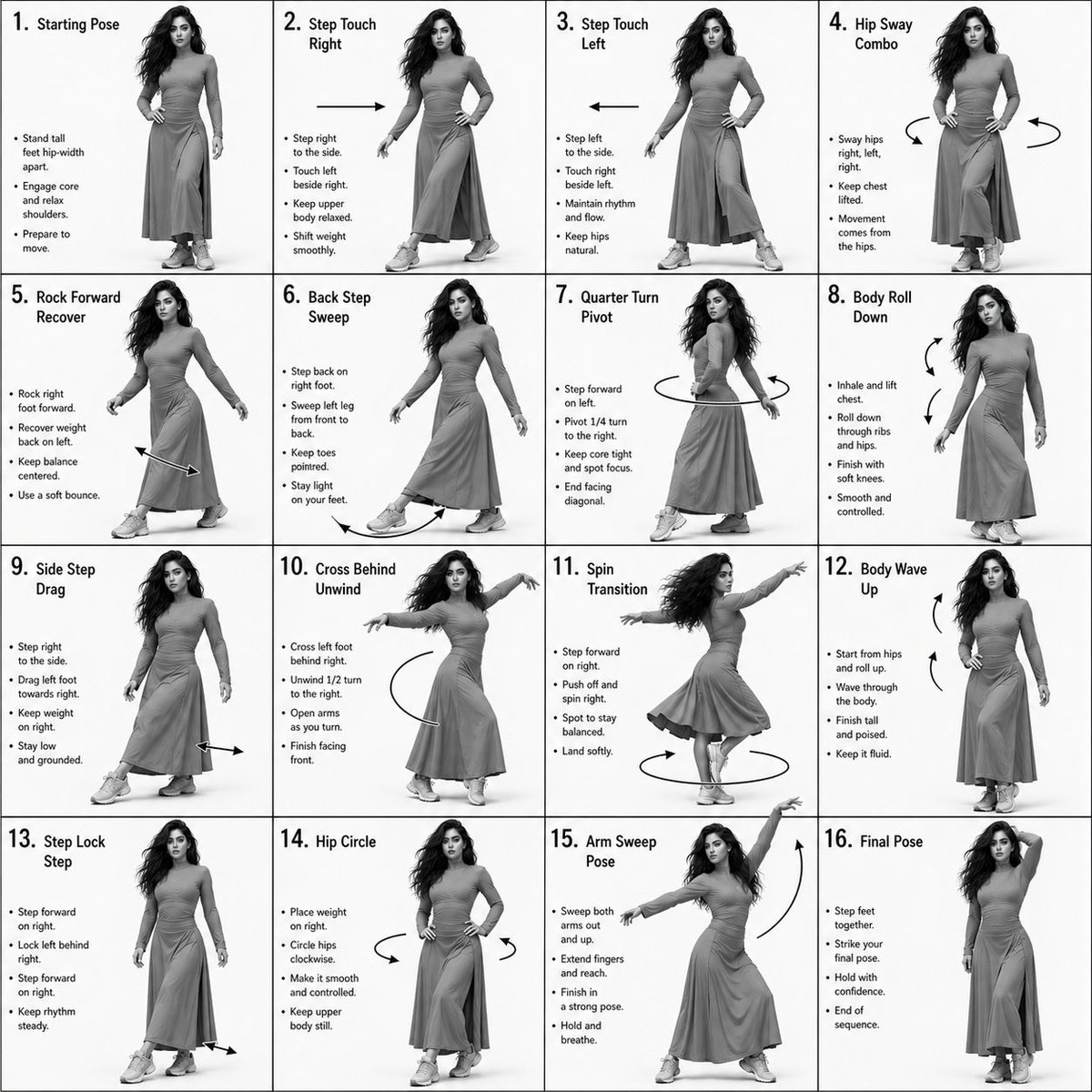
Step one writes a monochrome 4x4 choreography sheet — sixteen numbered panels of the same dancer, same wardrobe, with motion arrows between poses. Step two hands the sheet to Seedance i2v and renders a fifteen-second vertical dance tutorial that flows beat-to-beat. The whole thing happens in the console below.
The prompts below are the verbatim source. Copy them into the console above and tweak the dancer, wardrobe, or move list.
A long-form brief for GPT Image 2.0 that asks for a monochrome 4x4 grid — full-body pose per panel, step number + move title, three lines of instruction, plus motion arrows between frames. Negative constraints keep the sheet clean and instructional.
Dance Sequence Instruction Sheet

[VISUAL STYLE]
Monochrome grayscale composition featuring a highly detailed 3D-rendered female dancer. Designed like a professional choreography guide with a technical, diagram-inspired layout. Clean white background, soft studio lighting, and strong contrast to highlight body movement and posture.

[GRID LAYOUT]
Structured 4×4 panel grid (16 frames total), evenly spaced with thin black divider lines. Each panel is identical in size and clearly numbered from 1 to 16 to show a continuous dance progression.

[CHARACTER]
Use image1 as the base character. The same female dancer appears consistently across all panels with accurate likeness and proportions.

[WARDROBE]
The dancer wears a stylish, performance-ready outfit: a well-fitted top paired with a short, flowy skirt. The look should feel modern and visually appealing while still practical for dance movement. Fabric should subtly respond to motion (slight flow and folds), even in grayscale.

[PANEL STRUCTURE – EACH FRAME]
Top-left: Step number + short dance move title (e.g., "Step 5 – Spin Transition")
Center: Full-body pose capturing a precise moment in the choreography
Bottom-left: 3–4 lines of concise instruction describing the move
Overlay: Motion arrows and directional guides illustrating how the dancer transitions

[MOTION INDICATORS]
Incorporate curved arrows for fluid motion, straight arrows for directional steps, and circular indicators for spins or turns. Emphasize rhythm, weight shifts, and body isolation.

[RENDER QUALITY]
High-detail sculpted 3D style with smooth grayscale shading, subtle shadows, and clean linework. Maintain a polished, concept-art level finish with clarity in every pose.

[RESTRICTIONS]
No color, no background scenery, no extra characters, no visual clutter — only the dancer and instructional elements.
Model — gpt-image-2
A scene-by-scene shot list for Seedance 2.0 i2v. The reference sheet locks the dancer; the prompt scripts the 16 steps in strict order, camera direction, wardrobe continuity, music BPM, and the final pose hold.
[PROJECT TYPE]
Cinematic dance tutorial video with structured choreography progression.

[SCENE & ENVIRONMENT]
Spacious modern dance studio / rehearsal hall with neutral tones, smooth wooden floor, soft diffused studio lighting. Minimal background distractions. Slight natural shadows for realism.

[CHARACTER]
Single female dancer matching the reference image (same facial structure, hair volume, and proportions). Consistent identity across the full video. Natural expressions, confident and focused.

[WARDROBE]
Modest, performance-ready outfit:
• Long, flowy skirt (mid-calf length, elegant movement)
• Fully covered fitted top (no cleavage, high neckline, long or mid sleeves)
• Neutral tones (grayscale-friendly look)
• Light sneakers suitable for dance
Fabric should respond naturally to motion (subtle flow, folds, inertia).

[VIDEO STRUCTURE — CORE REQUIREMENT]
The video must follow exactly 16 sequential dance steps, matching the choreography sheet.
Each step should:
• Flow continuously into the next (no hard cuts)
• Last ~2–3 seconds (compressed within the 15s total)
• Maintain rhythm continuity
• Preserve body positioning accuracy

[CAMERA DIRECTION]
Start: Medium full-body front shot
Smooth tracking + subtle dolly movements
Occasional slight angle shifts (front → 3/4 → side) to enhance clarity
No rapid cuts or jitter
Keep dancer fully visible at all times

[CHOREOGRAPHY FLOW — STRICT ORDER]
1. Starting Pose
2. Step Touch Right
3. Step Touch Left
4. Hip Sway Combo
5. Rock Forward Recover
6. Back Step Sweep
7. Quarter Turn Pivot
8. Body Roll Down
9. Side Step Drag
10. Cross Behind Unwind
11. Spin Transition
12. Body Wave Up
13. Step Lock Step
14. Hip Circle
15. Arm Sweep Pose
16. Final Pose (hold for 2–3 seconds)

[MOTION STYLE]
Smooth, controlled, natural human motion. Emphasis on weight shifts, hip movement, and balance. Clean transitions between steps. No exaggerated or AI-like jitter. Maintain realistic timing and momentum.

[VISUAL STYLE]
Photorealistic (NOT stylized AI look). Soft cinematic contrast. Optional subtle grayscale or muted color palette. Clean composition, no overlays or graphics.

[MUSIC DIRECTION]
Genre: Chill pop / soft electronic / light Afrobeat fusion
Tempo: ~90–105 BPM (ideal for step clarity)
Mood: Smooth, confident, slightly upbeat
Clear rhythm to match each movement transition
Light bass + soft percussion + ambient melody

[SYNC NOTES]
Each step aligns with beat transitions. Spins and turns hit musical accents. Final pose lands on a clean musical resolve.

[OUTPUT QUALITY]
9:16 vertical · 4K resolution · 24–30 FPS · high motion clarity · no artifacts or distortion.
Model — seedance-2-beta
Once you've tuned a routine you like, save the prompt pair and re-run for every track, season, or persona.
Browse all templatesThe AI dance tutorial template is a two-pass workflow that produces a 15-second vertical dance tutorial from text alone. The first pass writes a monochrome 4x4 instructional sheet — sixteen numbered panels of one dancer hitting consecutive choreography beats. The second pass animates those beats into a smooth tutorial video with synced motion.
You run the AI dance tutorial template inside the console above. Step one calls GPT Image 2.0 with a long-form brief that locks the dancer's likeness, wardrobe, and adds motion arrows. Step two hands the sheet to Seedance 2.0 image-to-video as a reference. Swap the moves, swap the dancer, hit generate, ship the AI dance tutorial template's final clip. GPT Image 2.0 image studio · Seedance 2.0 image-to-video
Dancer lock
Same face, body, wardrobe across all sixteen panels and the final dance from the AI dance tutorial template.
16-step continuity
The AI dance tutorial template forces sequential moves — no skipped beats, no jump cuts.
9:16 vertical
Output sized for Reels, TikTok, and Shorts. Native vertical — no crop pass.
BPM-aware motion
Each step lands on a beat. Spins on accents, final pose on a clean musical resolve.
Anyone shipping short vertical dance content where one performer has to hit consistent choreography across cuts.
Drop a new viral routine every week. The AI dance tutorial template scales with prompt swaps — no shoot, no rehearsal day.
Use the AI dance tutorial template to visualize a routine before teaching it. Sixteen-step sheet doubles as a class handout.
Generate move-of-the-week reels with a locked persona. The AI dance tutorial template keeps the brand-on instructor consistent.
Drop tie-in dance clips with every track release. The AI dance tutorial template handles the performer; you swap the BPM and moves.
Why the AI dance tutorial template beats a studio shoot for short-form social dance content where consistency matters more than virtuosity.
See credit pricing · Seedance 2.0 Fast · Travel vlog template
The AI dance tutorial template is a paired prompt: a GPT Image 2.0 brief that produces a monochrome 4x4 grid of sixteen consecutive choreography panels, and a Seedance 2.0 i2v shot list that turns those panels into a 15-second vertical dance video. Both prompts are on this page and free to remix.
No. The AI dance tutorial template's step-one prompt names the sixteen moves (step touch, hip sway, spin transition, body wave, etc.). Replace any of them with your own move names and the model adapts the panels.
Yes. Edit the character description and wardrobe block in step one. The AI dance tutorial template propagates the lock into step two so the dancer matches across the 4x4 sheet and the final video.
About four minutes end-to-end on Seedance 2.0 Fast. Step one (the choreography sheet) takes around a minute. Step two (the 15-second video) takes around three.
9:16 vertical — native for TikTok, Reels, and Shorts. No crop pass needed. The reference choreography sheet is 1:1 square; the final video is 9:16 vertical.
Yes — that is the whole point of the brief in step one. The prompt locks beauty, build, hair, wardrobe, and adds a negative-constraints block so the model does not drift into a different performer between panels. The sheet then locks the look for the AI dance tutorial template's video pass.
Yes. Step two's prompt names a target BPM and asks for beat-matched motion. Set the BPM to match your track, then sync the rendered video to your audio in any editor.
A plain text-to-video prompt asks the model to invent the choreography on the fly — which usually drifts mid-clip. The AI dance tutorial template lays out the sixteen-step plan visually first, so the video pass renders against a locked map. That is why every beat reads cleanly.
Two prompts, one console, one render. Copy, rename the moves, generate — or browse all AI workflow templates.