
Dance cover creators
Ride every viral routine with an original character. No face on camera, no re-learning the moves — one depth pass per trend.
Same moves,
a brand-new dancer.
Edition 10 — A depth-driven motion transfer
Step one flattens a viral dance clip into a depth video — the moves, rhythm, and camera survive; the dancer's face, outfit, and background don't. Step two locks a new character and scene in one reference image. Step three hands both to Seedance 2.0 reference-to-video, which re-renders the exact choreography on your character. The whole run happens in the console below.
The Seedance prompt below is the creator workflow translated to English — same structure, same constraints. Seedance 2.0 reads English and Chinese natively; keep the @video_1 and @image_1 tokens when you adapt it.
Run a clip of 15 seconds or less through the converter below — it runs Depth Anything entirely in your browser, free, and the clip never leaves your device. Choreography, timing, body mass, and camera movement survive; the dancer face, wardrobe, and location do not.
Runs entirely in your browser — the clip never leaves your device. The first run downloads a ~50MB model, then it is cached.
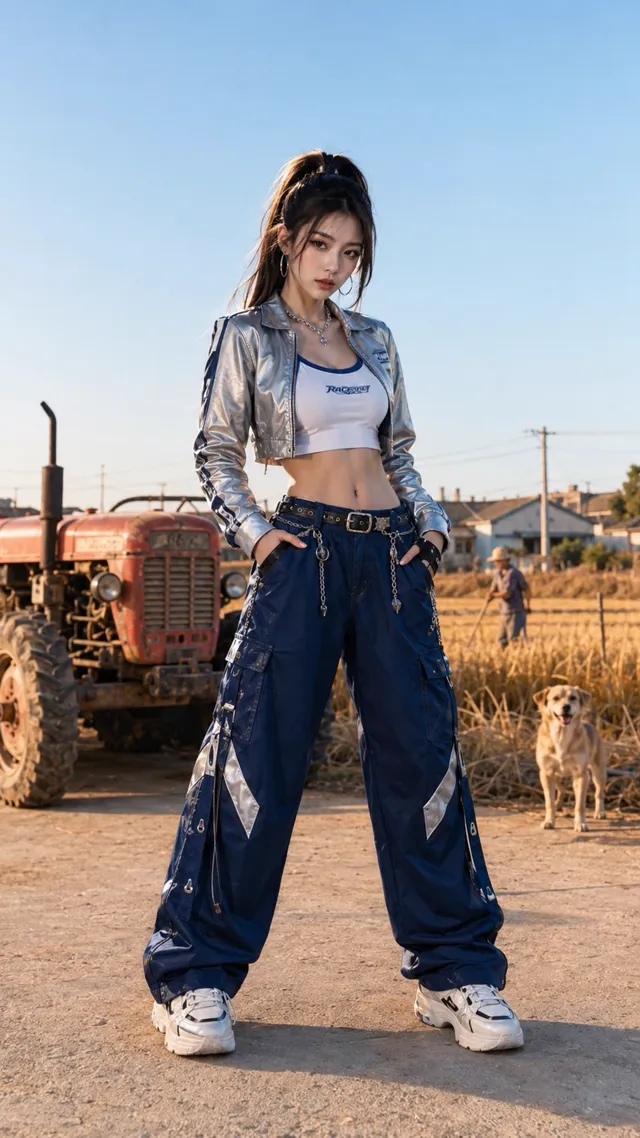
A single reference image carries the entire new identity — here, a techwear dancer on a farmyard threshing floor with a red tractor, golden fields, and village dogs. Generate it in the image studio with any model; reuse the exact same descriptors later in the video prompt so nothing drifts.
Upload the depth video as @video_1 and the reference image as @image_1 in the Seedance 2.0 reference-to-video studio, then paste the verbatim prompt. It pins a fixed camera, a single 15-second take, and a strict follow-the-reference rule — no new moves, no scene drift.
Generate a 15-second, 9:16 vertical, high-definition photorealistic dance video shot from a fixed camera position in one continuous take. No cuts, no transitions, no push-in or pull-out, no orbiting — for the entire video.

@video_1 is the Depth dance reference, used only to control the movements, rhythm, body weight shifts, turn directions, dancer position, and camera framing. Strictly follow the choreography order in the reference and reproduce every arm swing, hip twist, knee lift, cross step, jump, and pause as closely as possible. Do not add new moves.

@image_1 is the only character and scene reference. Keep the adult East Asian female dancer from the image, around 20 years old, stable throughout: same face, figure, high ponytail, and outfit — silver cropped techwear jacket, white sports bra, loose dark-blue cargo work pants, metal waist chain, and white sneakers.

Keep the rural farmland scene from the image: a flat threshing yard, an old red tractor, golden fields, villagers, and a Chinese rural dog. The dancer stays at the center of the frame dancing earnestly; background people and the village dog give only slight natural reactions — they do not dance along, steal focus, or block the dancer.

The dancer is tall and slender with a small waist and long legs; the moves are cool, fierce, relaxed, and powerful. Use a slightly low-angle full-body medium-wide shot, without exaggerated perspective. Keep the dancer fully in frame from head to shoes, with feet planted firmly on the ground.

The high ponytail, jacket hem, pant legs, and waist chain swing naturally with the movements. Real afternoon sunlight, real skin texture, and a real camera feel.

Avoid: face swaps, outfit changes, character scaling, feet sliding, body clipping, fused limbs, duplicated background people, villagers dancing along, the dog dancing, the tractor moving, camera cuts, subtitles, text, logos, watermarks.
Model — seedance-2-beta
One depth video can carry a whole season of characters — keep the motion, re-run with a new reference image each time.
Browse all templatesThe AI depth dance template is a three-pass motion-transfer workflow. Pass one converts a reference dance clip into a depth video — a grayscale geometry map that keeps every arm swing, hip twist, jump, and camera move but contains no recognizable face, outfit, or location. Pass two designs a brand-new character and scene as one reference image. Pass three hands both to Seedance 2.0, which re-renders the original choreography on your character, in your world.
The method was shared by Korean creator @impalementd, and this tractor-dance edition by @MrLarus — the original routine is by Douyin creator 周同学, whose likeness never enters the pipeline. You run the whole workflow on this page — depth extraction in Step 1, then both generation passes in the console above: GPT Image 2.0 image studio · Seedance 2.0 reference-to-video
Motion-only transfer
Depth keeps choreography, rhythm, and framing. Faces, wardrobe, and backgrounds are gone before Seedance 2.0 ever sees the clip.
Screening-proof input
Source clips with real faces or recognizable IP routinely fail input review on every tier. Their depth versions pass — they contain geometry, not people.
Bilingual prompting
Seedance 2.0 reads Chinese and English natively. The prompt here is an English translation of the creator original Chinese run — either language works.
≤ 15s reference
Up to 3 reference clips, 15 seconds total. Video-input tiers bill input plus output seconds — budget for both.
Anyone who wants trending choreography on screen without putting a real person's likeness into the pipeline.
Ride every viral routine with an original character. No face on camera, no re-learning the moves — one depth pass per trend.
Keep a VTuber or virtual artist dancing weekly. The persona stays consistent because it comes from your reference image, not the source clip.
Put the mascot on this week's dance trend without licensing a dancer's likeness. Swap the scene to your storefront in the same pass.
Preview a routine on different bodies, outfits, and stages before booking a shoot. The depth video is the routine; everything else is a re-render.
Why depth-driven motion transfer beats re-shooting a trend when the choreography matters and the performer is negotiable.
See credit pricing · Seedance 2.0 Fast · Dance tutorial template
It is a three-pass motion-transfer workflow: convert a reference dance clip into a depth video, generate a new character and scene as one reference image, then have Seedance 2.0 reference-to-video re-render the exact choreography on your character. The verbatim Seedance prompt is on this page and free to remix.
Two reasons. Creatively, depth keeps only what you want to copy — motion, rhythm, body structure, camera framing — so the new render owes nothing visual to the source. Practically, source clips containing real faces or recognizable IP routinely fail input screening; a depth video contains neither, so the same choreography becomes usable.
Use the built-in extractor in Step 1 of this page — it converts entirely in your browser with Depth Anything on WebGPU, free, and your clip never leaves your device (works in desktop Chrome, Edge, and Safari). Any external depth tool also works: search Hugging Face Spaces for a video depth model, or ask Claude to build you a small Gradio depth-extractor site — that is exactly what the workflow creator did.
No. The depth video carries no face, skin, wardrobe, or background — only geometry over time. Everything visible in the final render comes from your reference image and prompt. The example on this page replaces the original performer entirely with a generated techwear character.
Depth conversion removes likeness and footage-reuse concerns, but original choreography and the music track are separate rights — the workflow's own creator flags this. For commercial use, treat the routine and the audio the way you would any licensed material. The example credits the original tractor dance to Douyin creator 周同学.
It is a faithful English translation of the creator original Chinese prompt — same structure, same constraints, same @video_1 and @image_1 tokens. Seedance 2.0 is natively bilingual, so both versions behave the same: strict follow-the-reference rules for @video_1, a full identity lock for @image_1, camera constraints, and a negative list.
One image generation plus one reference-to-video pass. Note that tiers which bill video input count input plus output seconds — a 15-second depth reference plus a 15-second render bills roughly like 30 seconds. A full run typically lands around 90–140 credits depending on tier and resolution.
Open the reference-to-video studio, upload the depth video as your reference video (@video_1) and the character sheet as your reference image (@image_1), set 9:16 and 15 seconds, and paste the prompt. Keep the fixed-camera and no-new-moves language — that is what makes the render follow the reference beat for beat.
Extract a depth video, lock a character sheet, paste the verbatim prompt — the console above runs the Seedance 2.0 pass.