
Lifestyle creators
Drop a weekly GRWM without filming. The AI GRWM template scales with prompt swaps — new activity, new vibe, new drop.
Thirty-two panels,
one scroll-stopping routine.
Edition 04 — A two-step GRWM routine
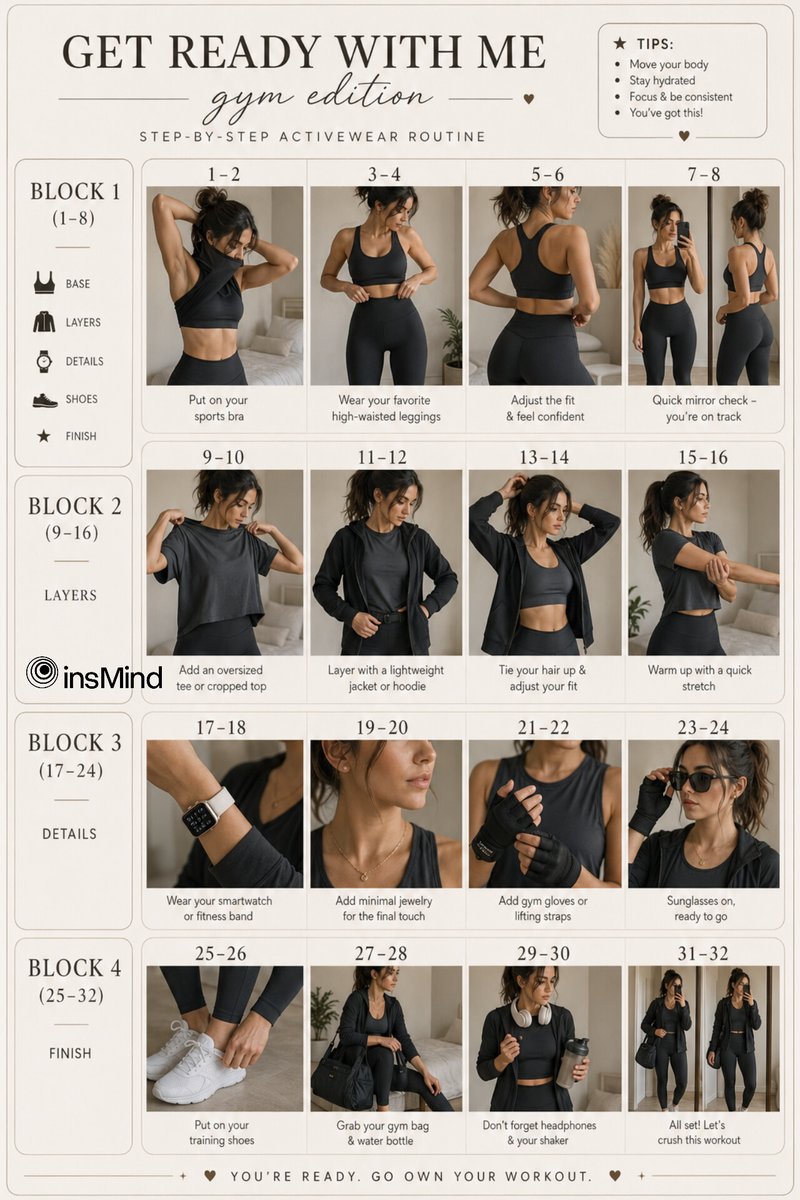
Step one writes a beige editorial 32-panel storyboard — four 8-panel blocks of one woman layering an outfit from sports bra to sneakers. Step two hands the sheet to Seedance i2v and renders a fifteen-second outfit-routine video with snap transitions and a confident walk-out close. The whole thing happens in the console below.
The prompts below are the verbatim source. Copy them into the console above and tweak the outfit, vibe, or activity.
A storyboard brief for GPT Image 2.0 that asks for a beige editorial 32-panel sheet across four blocks — base, layers, accessories, finish. Each panel is a clean fashion-editorial frame of the same woman in a step of the routine.
Aesthetic "Get Ready With Me – Gym Edition" storyboard layout, minimal neutral-toned design, soft beige and cream color palette, clean editorial grid.

Top header text:
"GET READY WITH ME"
subtitle: "gym edition" in elegant script font
subheading: "step-by-step activewear routine"

The layout is divided into 4 blocks, each showing a sequence (1–8 steps per row), featuring the same young woman throughout with consistent face, natural makeup, athletic toned body, hair tied in a messy bun or sleek ponytail.

BLOCK 1 – BASE (1–8)
1–2: putting on a fitted sports bra
3–4: wearing high-waisted gym leggings
5–6: adjusting waistband / smoothing fit
7–8: mirror check, relaxed confident pose

BLOCK 2 – LAYERS (9–16)
1–2: putting on oversized gym t-shirt or cropped top
3–4: adding lightweight zip-up hoodie or jacket
5–6: tying hair tighter / adjusting outfit
7–8: slight movement pose (stretching arms or twisting body)

BLOCK 3 – DETAILS (17–24)
1–2: wearing smartwatch / fitness band
3–4: adding minimal jewelry (thin chain, studs)
5–6: putting on gym gloves or lifting straps
7–8: wearing sunglasses or tying hair final look

BLOCK 4 – FINISH (25–32)
1–2: putting on training shoes (clean white sneakers)
3–4: grabbing gym bag / water bottle
5–6: holding headphones / protein shaker
7–8: full-body mirror shot, confident final look

Side icons representing categories: base, layers, accessories, shoes, final look.

Soft natural lighting, indoor minimal room or modern apartment, neutral background, clean shadows, editorial fashion photography style, consistent framing across all panels.

Footer text:
"You're ready. Go own your workout."
Model — gpt-image-2
A scene-by-scene shot list for Seedance 2.0 i2v. The storyboard locks the model and the outfit progression; the prompt scripts the four 4-second blocks, snap transitions, fabric motion cuts, and the closing walk-out.
Use provided storyboard image as reference.

CONCEPT:
Get Ready With Me — Gym Edition

TIMELINE:
0:00–0:04
• Sports bra on
• High-waisted leggings wear
• Waistband adjustment
• Mirror check

0:04–0:08
• Oversized tee / cropped top
• Lightweight hoodie or jacket
• Hair tie (ponytail/bun)
• Light stretch / body turn

0:08–0:12
• Smartwatch / fitness band
• Minimal jewelry
• Gym gloves / lifting straps
• Sunglasses on

0:12–0:15
• Training shoes
• Grab gym bag + water bottle
• Headphones / shaker
• Walk-out + final confident look

STYLE:
Minimal, neutral tones, soft beige/grey palette, natural indoor lighting, clean modern interior, athletic aesthetic.

CAMERA:
Close-up + mid shots, soft focus, shallow depth of field, steady framing, subtle handheld realism.

TRANSITIONS:
Match cuts, outfit snap transitions, fabric motion cuts, quick clean jump cuts synced to movement.

OUTPUT:
Loopable, smooth pacing, satisfying flow, social media ready (vertical 9:16 safe center crop within 16:9 frame).
Model — seedance-2-beta
Once you've tuned a GRWM you like, save the prompt pair and re-run for every activity, season, or persona.
Browse all templatesThe AI GRWM template is a two-pass workflow that produces a 15-second Get-Ready-With-Me outfit routine from text alone. The first pass writes a beige editorial 32-panel storyboard of one woman layering an outfit step-by-step. The second pass animates those panels into a smooth routine video with snap transitions and a confident walk-out.
You run the AI GRWM template inside the console above. Step one calls GPT Image 2.0 with a brief that locks the model's likeness across four 8-panel blocks. Step two hands the sheet to Seedance 2.0 image-to-video as a reference. Swap the activity (gym, work, night out, travel), swap the model, hit generate, ship the AI GRWM template's final clip. GPT Image 2.0 image studio · Seedance 2.0 image-to-video
Model lock
Same face and body across all thirty-two panels and the final video from the AI GRWM template.
Four 8-panel blocks
Base, layers, accessories, finish — the AI GRWM template's structure mirrors how creators actually shoot GRWMs.
Snap transitions
Match cuts and fabric-motion cuts synced to outfit changes. No awkward dwelling between looks.
Social-ready
16:9 landscape with a vertical-safe center crop. Drops cleanly into Reels, TikTok, Shorts, and YouTube.
Anyone shipping short-form lifestyle content where one persona's outfit transition is the hook.
Drop a weekly GRWM without filming. The AI GRWM template scales with prompt swaps — new activity, new vibe, new drop.
Showcase a capsule from base layer to accessories. The AI GRWM template handles the model so the brand stays center.
Build outfit-routine spots for every product drop. The AI GRWM template keeps the persona on-brand across campaigns.
Pair the AI GRWM template's clip with shoppable outfit links. One template, dozens of looks.
Why the AI GRWM template beats a studio GRWM shoot for short-form social content where consistency and speed matter.
See credit pricing · Seedance 2.0 Fast · Travel vlog template
The AI GRWM template is a paired prompt: a GPT Image 2.0 brief that produces a beige editorial 32-panel Get-Ready-With-Me storyboard across four blocks (base, layers, accessories, finish), and a Seedance 2.0 i2v shot list that turns those panels into a 15-second outfit-routine video with snap transitions. Both prompts are on this page and free to remix.
No. The AI GRWM template's step-one prompt names the four blocks, the per-panel structure, the color palette, and the editorial framing. You just adjust the activity (gym, work, brunch, travel) and the wardrobe pieces.
Yes. Edit the block content in step one — work, night out, brunch, travel, anywhere with a discrete outfit progression. The AI GRWM template's structure stays the same; only the wardrobe and accessories change.
About four minutes end-to-end on Seedance 2.0 Fast. Step one (the 32-panel storyboard) takes around a minute. Step two (the 15-second video) takes around three.
16:9 landscape with a vertical-safe center crop, so the final clip drops cleanly into Reels, TikTok, Shorts, and YouTube without a re-crop pass.
Yes — that is the whole point of the brief in step one. The prompt spells out face, hair, body, and a negative-constraints block so the model does not drift into a different person between blocks. The sheet then locks the look for the AI GRWM template's video pass.
Generations from seedance2.so are yours to use. Check the AI GRWM template prompt for any third-party brand logos or trademarked apparel before publishing on a brand channel.
A plain text-to-video prompt usually drifts mid-clip — the model changes wardrobe or face. The AI GRWM template lays out the 32-step plan visually first, so the video pass renders against a locked map. That is why the outfit progression reads as one continuous routine.
Two prompts, one console, one render. Storyboard, then video — or browse all AI workflow templates.