
Seedance 2.0 In-Between Technique: Anime Tutorial
Learn the Seedance 2.0 in-between technique: plan first and last frames, write transition prompts, chain anime clips, and fix character continuity drift.
The Seedance 2.0 in-between technique gives an AI video model two jobs it can actually see: begin here and finish there. Instead of asking for an entire anime sequence from one prompt, you design a first frame and a last frame, let Seedance generate the motion between them, then carry the ending forward into the next clip.
Reddit creator u/ElasticAIGirl used that loop for a 79-second retro-anime sequence and reported spending about four hours on the example.[1] The name needs one caveat: “in-between” is community shorthand, not the traditional animation process of drawing intermediate poses by hand. The actual feature is first-and-last-frame guided video generation, a workflow also documented in Dreamina’s Seedance 2.0 guide.[3]
The community example that inspired this tutorial. Video by u/ElasticAIGirl; view the original Reddit post.
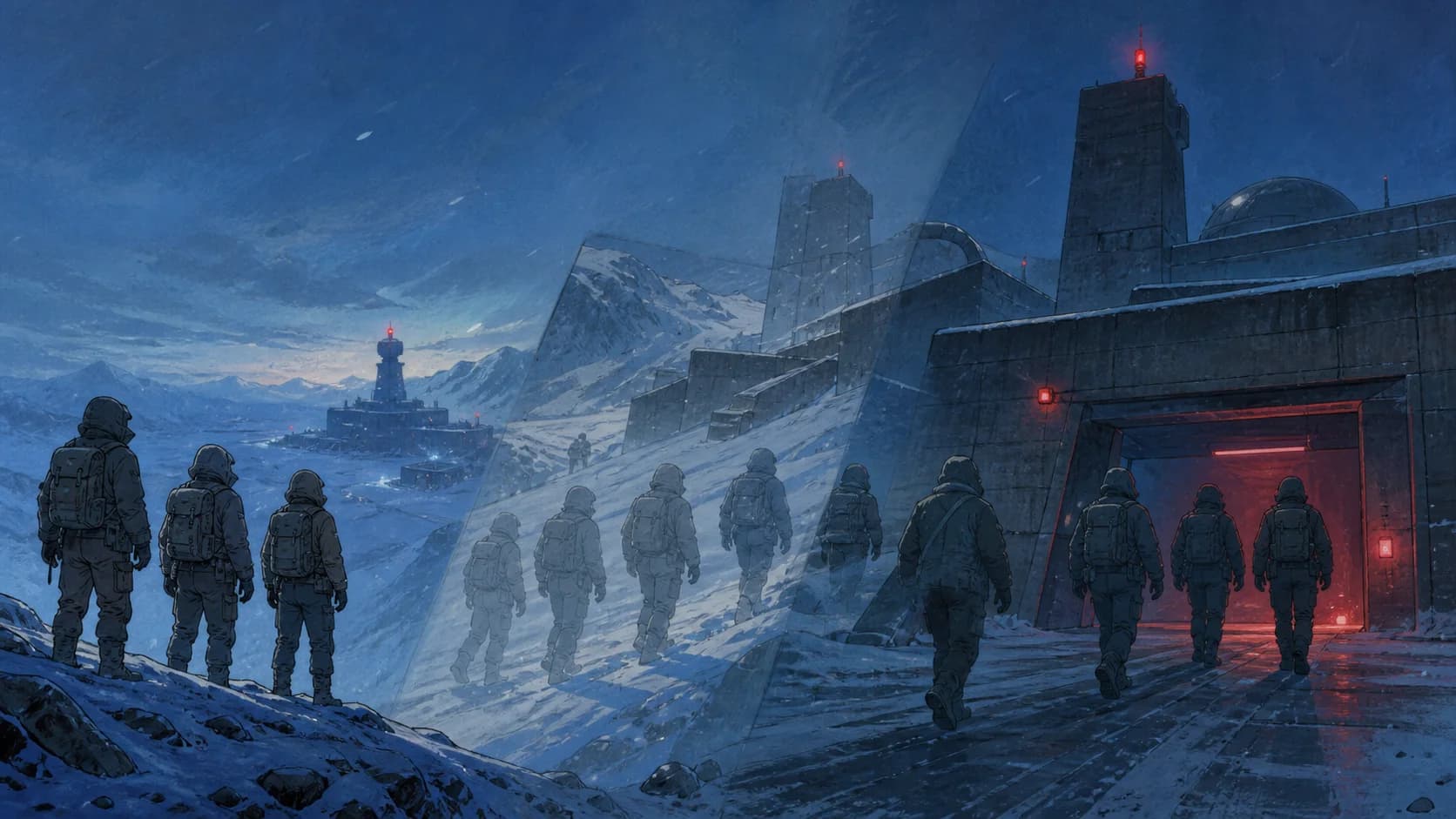
The FIRST FRAME and LAST FRAME labels in the example are an explanatory layout added by the creator, not Seedance interface elements. The lower panel shows the generated bridge while the upper pair shows its anchors. Across the finished edit, the characters move from a snowy approach through corridors and a control room, then escape by helicopter. The sequence holds its broad story and palette, but equipment, room geometry, and control-screen lettering still drift. That is exactly why this method needs continuity checks rather than blind chaining.
TL;DR
- Treat “in-between” as a first-frame + last-frame workflow, not an official feature name or traditional hand-drawn inbetweening.
- Keep the two endpoint images close in subject count, composition, lighting, and story time. A smaller visual gap gives the model less room to improvise.
- Write the prompt around action, camera plan, continuity locks, and audio, because the images already describe how the shot starts and ends.
- Build a keyframe chain: clip 1 runs from A to B, clip 2 from B to C, and clip 3 from C to D.
- Review every join before generating the next clip. If a character disappears or the final frame drifts, fix that seam immediately.
- Add music, held frames, and timing adjustments after generation. One soundtrack across the edit is easier to control than separate music inside every clip.
What the Seedance 2.0 in-between technique controls
First-and-last-frame generation gives Seedance two visual anchors. It does not lock every frame between them. The model still decides how bodies move, where a cut happens, what the camera does between anchors, and how background details change.
That distinction explains both the appeal and the failure cases. Two strong endpoint images can produce a shot that feels directed. Two distant endpoints can force the model to invent missing blocking, actions, and camera coverage. In the Reddit discussion, one creator noted that the demonstrated endpoints were unusually far apart and suggested tighter pairs for more control. Other viewers spotted slippery motion and a disappearing third character.[1]
| You define | Seedance interprets |
|---|---|
| First-frame composition | Intermediate body poses |
| Last-frame composition | Motion path and timing |
| Main action | Transitions between camera views |
| Continuity constraints in the prompt | Small background and costume details |
| Requested audio direction | Exact sound placement and mix |
First-and-last-frame input is documented rather than hidden. Dreamina’s guide tells users to upload a first and last frame, then describe the transition.[3] ByteDance also describes Seedance 2.0 as accepting image, video, audio, and text references, while acknowledging that multi-subject consistency still has room to improve.[2]
Step 1: design a keyframe chain, not a montage
Start with four story states. Each state should be a still image that can serve twice: first as the ending of one clip, then as the beginning of the next.
For a snowy-base sequence, the chain might look like this:
| Keyframe | Story state | Continuity that must survive |
|---|---|---|
| A | Three figures see the base from a ridge | Character count, coats, backpacks |
| B | The same figures reach the outer gate | Travel direction, weather, base design |
| C | They enter a narrow corridor | Clothing colors, group order, lighting logic |
| D | They stop behind a concrete column | Character count, corridor geometry, props |
The mistake is to make A and B describe an entire scene. If A is a distant exterior and B is already deep inside the building, Seedance must invent the run, the gate interaction, the entrance, and the location change in one pass. Add another endpoint instead. A more boring chain usually produces a more usable sequence.
Before generating images, write a compact continuity card:
- Exact number of characters
- One-line description of each outfit
- Distinctive but simple color for each character
- Fixed travel direction, such as screen left to screen right
- Weather, time of day, and practical light sources
- Props that must not appear or disappear
This card is more valuable than a paragraph of mood adjectives. It gives you a checklist for every endpoint and every rendered clip.
Step 2: create endpoint images that can cut together
The Reddit workflow uses Nano Banana to create each future story state, but the method is not tied to one image model.[1] Use any image generator or drawing workflow that lets you preserve the same characters and world.
Generate keyframe A first. For keyframe B, supply A as a visual reference and describe only the next state:
Create the next story beat five minutes later.
The same three patrol members have reached the outer gate.
Preserve their exact clothing colors, backpacks, height order,
snowy weather, blue-hour lighting, and left-to-right travel direction.
Use an original hand-painted cel-animation look with painted backgrounds.
Do not imitate a named film, artist, studio, or franchise.
Place A and B side by side before opening Seedance. Check them like a continuity editor:
- Are there exactly three people in both images?
- Does each outfit keep the same silhouette and color?
- Is the base still the same building?
- Does the camera remain on the same side of the action?
- Can a body plausibly move from the first pose to the second?
- Do both images share the same aspect ratio?
If one answer is no, repair the endpoint now. Seedance cannot reliably resolve contradictions that are already baked into the two anchors.
Step 3: animate one endpoint pair in Seedance
Open the image-to-video studio, choose a Seedance 2.0 option that exposes First + Last Frame, and upload A as the first frame and B as the last frame. Interface labels can vary by provider, but the two roles should remain explicit.
Write the transition prompt in five parts:
Bridge the two supplied frames.

Action: The same three patrol members run across the snow to the base gate.

Camera: Begin with a wide rear tracking shot, cut once to a low close-up
of their boots, and end on the supplied gate composition.

Continuity: Keep exactly three characters. Preserve each coat color,
backpack, body size, travel direction, weather, and base architecture.

Audio: Wind and footsteps only. No music.
This differs slightly from asking for “five different camera angles.” That request worked surprisingly well in the Reddit demo, but it also gives the model five chances to break geography or subject count.[1] For a short clip, one continuous move or one deliberate cut is easier to judge and easier to stitch.
The prompt also avoids redescribing the endpoints. Seedance can already see them. Spend the text budget on the missing information: what happens, how it is photographed, and what cannot change.
Generate a few candidates only if you need them, then grade each result against the same list:
- Does the clip start close to A and end close to B?
- Are all subjects present throughout?
- Is the action readable without the prompt?
- Does the camera cross the action axis?
- Do faces, hands, backpacks, or doors melt between cuts?
- Is the final frame clean enough to start the next clip?
Do not choose the flashiest take by default. Choose the one that leaves the cleanest handoff.
Step 4: carry the last frame into the next clip
Once clip A→B works, turn its actual final rendered frame into the first frame for the next shot. If the render lands perfectly on your authored B image, you can reuse B. If it deviates, extract the real final frame. That prevents a visible jump between clips.
Then generate keyframe C from that new starting frame and animate B→C. Repeat for C→D.
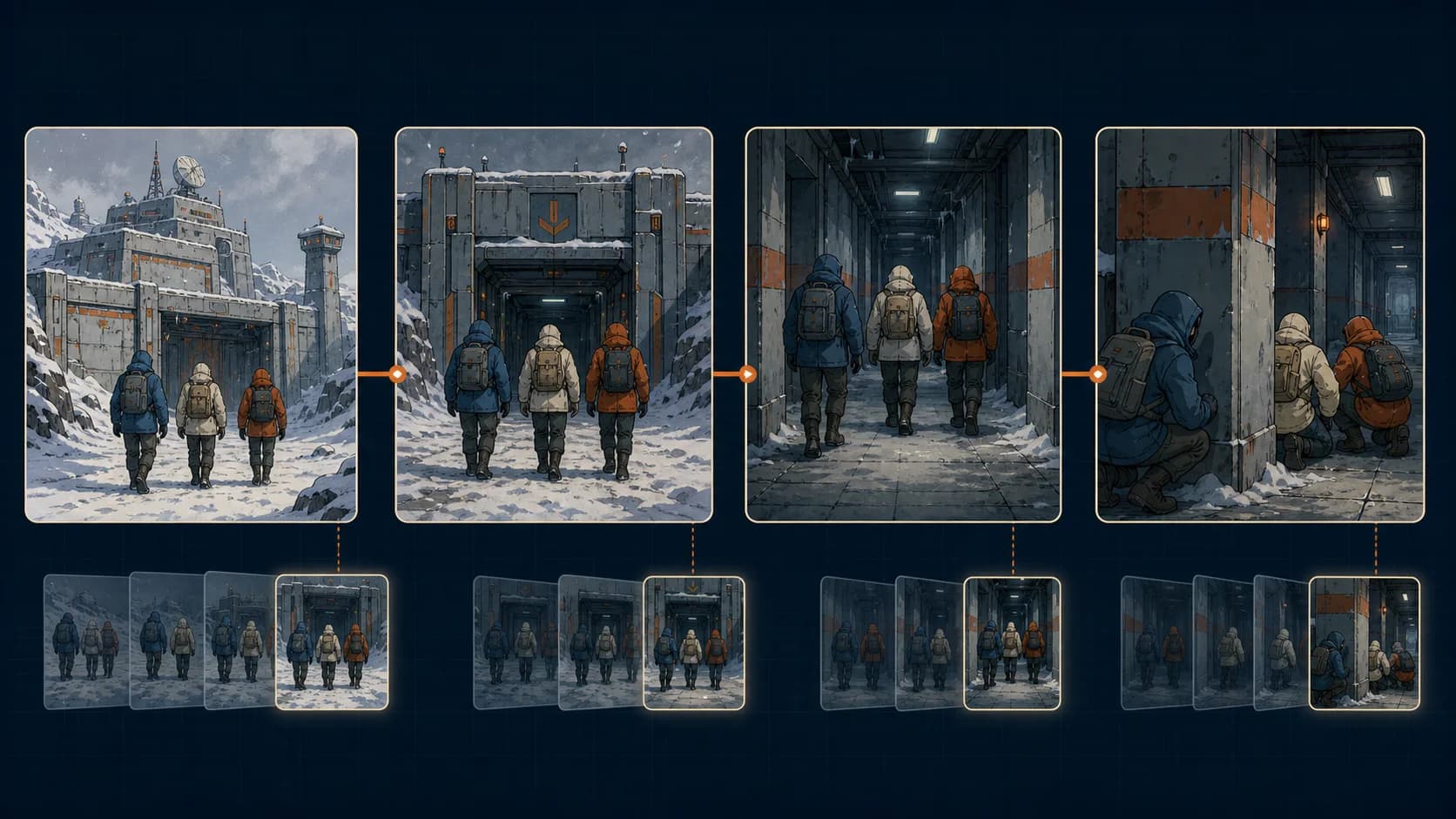
| Clip | First frame | Last frame | Main action |
|---|---|---|---|
| 1 | A: ridge | B: gate | Run toward the entrance |
| 2 | Rendered B | C: corridor | Enter and move down the corridor |
| 3 | Rendered C | D: column | Stop and take cover |
The rendered-frame handoff matters because an AI video can finish a few pixels, poses, or details away from the uploaded endpoint. Reusing the intended still instead of the actual output hides that difference until the edit, where it appears as a pop.
Keep the prompt scaffold stable from clip to clip. Change the action and camera plan, but retain the character count, costume locks, direction, environment, and audio policy. Consistency comes from repeated constraints plus small endpoint gaps, not from finding one magic phrase.
Step 5: edit the chain so it feels like anime
Generated motion often looks too continuous for limited-animation aesthetics. A commenter described parts of the example as “slippery,” while another suggested controlling cadence and holding some backgrounds still.[1] Treat that as post-production advice, not a guaranteed Seedance setting.
In your editor:
- Trim the unstable first and last few frames from each clip when possible.
- Cut on movement so the eye follows the action instead of the seam.
- Hold a clean frame briefly when the scene needs weight or anticipation.
- Retime only the section that feels floaty; do not slow the entire clip by default.
- Add one music track across the assembled sequence.
- Build footsteps, wind, doors, and room tone around the final cut.
- Match color and grain after all clips are in order.
Asking for “no music” during generation keeps each segment easier to combine. It does not mean the finished video should be silent. It means music becomes an editorial decision instead of a different baked-in track on every shot.
Fix the common failure modes
| Problem | Likely cause | Practical fix |
|---|---|---|
| A character disappears | Endpoint count differs, subjects overlap, or the story gap is too large | Separate silhouettes, write “exactly three,” and add an intermediate endpoint |
| Motion looks slippery | Too many actions or camera changes in one clip | Use one main action, fewer cuts, and selective holds in the edit |
| Style drifts | Each endpoint was generated from a fresh text prompt | Reuse the prior frame as a reference and maintain a small style sheet |
| The camera feels random | The prompt asks for many angles without order | Name the opening view, one transition, and the required ending composition |
| The seam pops | The intended endpoint differs from the rendered final frame | Extract the actual final frame and use it as the next first frame |
| The result becomes a morph | Start and end poses or locations are too far apart | Insert another keyframe that represents the missing story beat |
| Background objects move | The scene contains too many small details | Simplify the set and lock only the few props the story needs |
If the same error survives two attempts, change the images before expanding the prompt. Endpoint repair usually removes more ambiguity than another paragraph of instructions.
Reusable prompt template
Bridge the two supplied frames.

Action: [One subject performs one readable action].

Camera: Start with [opening shot]. Then [one move or cut].
End on the exact supplied last-frame composition.

Continuity: Keep exactly [number] subjects. Preserve [outfit colors],
[props], [screen direction], [weather], [lighting], and [location geometry].
Do not add or remove characters or objects.

Style: Original [production technique / era vocabulary].
Do not imitate a named artist, studio, film, franchise, or character.

Audio: [Required ambience and effects]. No music.
Replace bracketed text with visible facts. Avoid contradictory direction such as “fixed camera” and “five camera angles” in the same prompt. If you want multiple shots, list them in chronological order.
FAQ
Is “in-between” an official Seedance 2.0 feature name?
No. It is an informal community label for first-and-last-frame guided generation. Traditional animation inbetweening means artists create intermediate drawings between key poses. Here, the model generates an entire video path between two supplied images.
Do I need Nano Banana for this workflow?
No. The Reddit creator used Nano Banana to make future endpoint images, but any image tool can work if it preserves character, style, composition, and story continuity.[1]
How far apart should the first and last frames be?
There is no universal time or distance. Measure the semantic gap: how many actions, location changes, pose changes, and camera decisions must happen between the images? If the answer is more than one clear beat, add another endpoint.
Why does a character disappear between frames?
Multi-subject consistency remains a known hard case even in ByteDance’s own discussion of the model.[2] Keep subjects visually separated, match the count in both endpoints, repeat the exact count in the prompt, and shorten the story gap.
Should I request five different camera angles?
Only when the shot has enough story space for them and you accept more model discretion. For tighter control, specify one move or one cut and require the final composition. You can build variety across several linked clips instead of forcing it into one.
Can this make a long anime sequence?
It can build a longer sequence from short linked clips, but every join needs review. Character details, geography, and pacing can drift across the chain. Treat each clip as a shot that must pass continuity before production moves on.
How much does the workflow cost, and how long does it take?
The Reddit author reported about four hours for the example but did not publish the number of attempts or total credits.[1] Cost depends on the platform, settings, clip length, and retries. Budget for rejected takes rather than assuming one generation per shot.
Can I use a famous anime style or character?
For publishable work, use characters and images you own or have permission to use. Describe production qualities such as hand-painted backgrounds, cel shading, restrained animation, cool shadows, and analog grain instead of requesting a living artist, named studio, franchise, or recognizable character.
Control grows one endpoint at a time
The useful idea in this Reddit workflow is not a secret prompt. It is the decision to replace one large, unpredictable generation with a chain of small visual contracts. Each pair says where the shot begins, where it ends, what must happen, and what must survive.
Keep the endpoint gap narrow. Reuse the actual rendered last frame. Lock subject count before style adjectives. Fix continuity before generating the next shot. Then let the edit handle cadence, music, and polish. That is the repeatable version of the Seedance 2.0 in-between technique.
References
[1] u/ElasticAIGirl, “How to Use Seedance 2.0’s ‘In-Between’ Technique to Create Old-School Anime Videos?”, r/seedance2pro, May 24, 2026.
[2] ByteDance Seed Team, “Seedance 2.0 Official Launch”, February 12, 2026.
[3] Dreamina, “How to Use Seedance 2.0”, accessed August 5, 2026.
Author

Categories
More Posts
7 Seedance 2.0 Prompts for Better AI Video Results
Copy seven Seedance 2.0 prompts for product ads, social hooks, explainers, lifestyle clips, trend remixes, and cinematic stories—with practical fixes.
GPT Image 2 + Seedance 2.0 Feels Like an Automated Animation Pipeline
A hands-on read on the GPT Image 2 + Seedance 2.0 workflow: what it really does, where consistency breaks, and which projects it actually fits — with real r/seedance2pro feedback.
How to make movie recap videos with AI, legally
How to make movie recap videos with AI for a faceless channel: split the story into beats, generate segments, assemble the timeline, and stay copyright-safe.